

Update or delete? Cleaning up old content on your site

Sometimes, content on your website becomes irrelevant or outdated and you need to decide whether to update it or delete it. It can be tricky to decide what needs to be done, but don’t let this hold you back. Regularly updating outdated content should be a key part of your content maintenance activities. Let’s help you make that decision and discuss when you should update existing content or remove it altogether.
Update old content that is still valid
On our blog, we have an article on meta descriptions that needs regular updating to keep it relevant. We just have to ensure it stays up to date with all the changes Google makes to the way it handles meta descriptions. Our post helps people write meta descriptions, even though the advice changes over time. Although the article itself might be what we call cornerstone content, its content must be updated to keep up with the latest standards, constantly.
You can also create new, valuable content by updating old posts and making them current again: old wine in new bottles, as the saying goes. You can, for example, merge multiple old blog posts about the same subject into one new post or simply replace older parts of your post with updated content.
A good rule of thumb is to check the amount of traffic you’re getting on a page or post. Are you considering removing a page or unsure about what to do with an outdated one? If that page is still attracting a lot of traffic, it would be a shame to delete it. It would be better to update it to make sure it’s accurate and reflects the latest developments in that field. If the page is not getting a lot of traffic, but the topic is important to you(r company), that can also be a good reason to reevaluate the page and update its content.
Read more: How to update your content in 10 steps (and make it better) »
Delete irrelevant posts or pages
It’s likely that you have old posts or pages on your site that you no longer need. Think along the lines of a blog post about a product you stopped selling a while ago and have no intention of ever selling again. Or an announcement of an event that took place a long time ago. You may also have old pages with little or no content, known as thin content pages. This outdated content no longer adds value, now or in the foreseeable future. In that case, you need to either make it clear that this content is no longer relevant or assign the URL a new purpose.
When we talk about deleting old content, I don’t mean simply pressing “delete” and forgetting about it. If you do that, the content may still appear in Google search results for weeks after deletion. The URL might actually have some link value as well, which would be a shame to waste. So, what should you do? Here are two options:
“301 Redirect” the old post to a related one
When a URL still holds value because, say, you have a number of quality links pointing to that page, you want to leverage that value by redirecting the URL to a related one. With a 301 redirect, you’ll inform search engines and visitors that a better or newer version of this content can be found elsewhere on your site. The 301 redirect automatically sends people and Google to this page.
Say you have an old post on a specific product. You need to delete it, so the logical next step would be to redirect that post to a newer post about this product. If you don’t have that post, choose a post about the closest product possible. One that can still help out the user in a way that the old product would. Redirecting to a relevant category might be an option in some edge cases, but this should not be standard practice. Furthermore, redirecting to the homepage should be avoided — this is an SEO anti-pattern.
There are a few ways to create a 301 redirect in WordPress, but using the redirect manager in Yoast SEO Premium makes it incredibly easy.
Tell search engines the content is intentionally gone
If there isn’t a relevant page on your site to redirect to, it’s wise to tell Google to forget about your old post entirely by serving a “410 Deleted” status. This status code will tell Google and visitors that the content didn’t just disappear; you’ve deleted it with a reason.
When Google can’t find a post, the server typically returns a “404 Not Found” status to the search engine’s bot. You’ll also find a 404 crawl error in your Google Search Console for that page. Eventually, Google will work it out, and the URL will gradually vanish from the search result pages. But this takes time.
The 410 is more powerful in the sense that it informs Google that the page is permanently deleted and will never be available again. You deleted it on purpose. Google will act on that faster than with a 404. Read up about the server status codes if this is all gibberish to you.
Keep reading: How to properly delete a page from your site »
Do you have old content to deal with?
Cleaning up old content should be part of your content maintenance routine. If you don’t review your old posts regularly, you’re bound to encounter issues sooner or later. You might show incorrect information to visitors or hurt your own rankings by having too many pages about the same topic, increasing the chances of keyword cannibalization. So prune your content regularly and decide what to do: update, merge or delete.
Clean up orphaned content with Yoast SEO Premium
A great place to start is with your orphaned content, which is content that has zero internal links to it. You might be surprised, but most of us have orphaned content on our website. Which is a shame, because both your audience and Google won’t be able to find this content. Meaning that you might be missing out on a great place in the search results and lots of traffic.
To help you clean up your old content, we’ve created an SEO workout that identifies those pages and guides you through four simple steps to fix them. These steps enable you to determine whether you want to update or delete a page. And when you do decide to update it, it also suggests pages or posts from which you can link to this updated content.
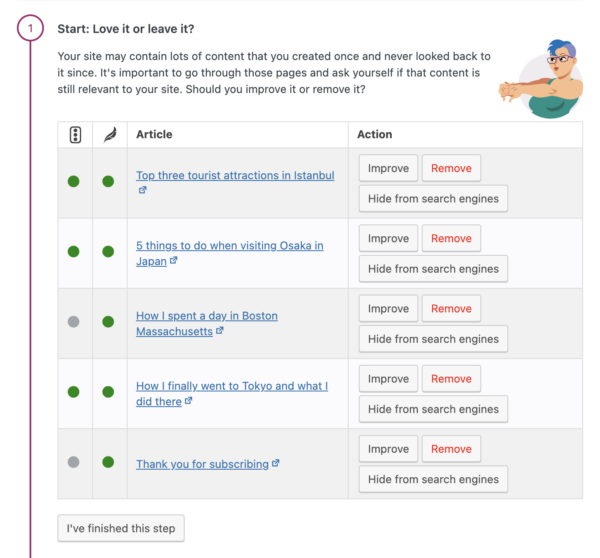
You will need Yoast SEO Premium to use this workout. You might also want to try our other internal linking SEO workout to help you rank higher with your best content, also available in the Premium plugin:
Unlock our SEO workouts with Yoast SEO Premium
Get Yoast SEO Premium and enjoy access to all our best SEO tools, training and SEO workouts!
