

What is a slug and how to optimize it?

When discussing SEO for WordPress, we often talk about creating the right slug for a page. Of course, we’re not talking about the slimy creature that eats your plants. So, what is this ‘slug’ then? And why should you optimize it? In this post, we’ll explain everything you need to know.
Key Takeaways
- A slug is a user-friendly URL component that identifies specific pages, improving both user and search engine understanding.
- Optimizing slugs enhances SEO by including keywords, creating memorable links, and ensuring user-friendliness.
- Yoast SEO provides tools for analyzing and improving slugs, helping users incorporate focus keyphrases effectively.
- Using clear and concise slugs boosts click-through rates and aids in mobile-first indexing.
- Avoid common mistakes like using default slugs, creating duplicates, or making slugs too long to maintain effective SEO.
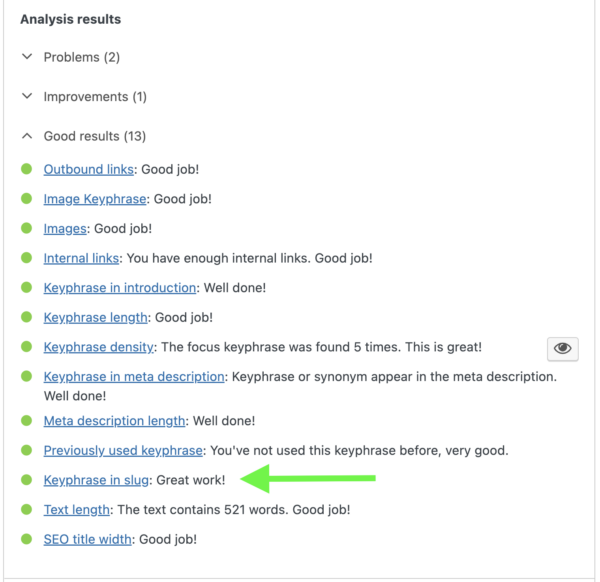
Do you have an orange or red traffic light for the ‘keyphrase in slug’ check in Yoast SEO? Here’s what that check does and how to turn that light green.
What is a slug?
A slug is the part of a URL that identifies a particular page on a website in an easy-to-read form. In other words, it’s part of the URL that explains the page’s content. The meaning of slug in web development refers to this user-friendly text string that comes after your domain name.
For this article, for example, the URL is https://yoast.com/slug, and the slug is simply ‘slug’.
What is a slug URL?
When people ask, “what is a slug URL?”, they’re referring to the complete web address that includes the slug component. A slug URL is the full path where your content lives on the internet. It consists of:
- Domain name: yoast.com
- Slug: /slug (or /your-page-name)
Together, these form the complete slug URL that visitors and search engines use to find your content.
How to edit a URL slug
In WordPress, the slug is the part of your URL that you can edit when writing or editing a post. Editing it in WordPress looks like this:
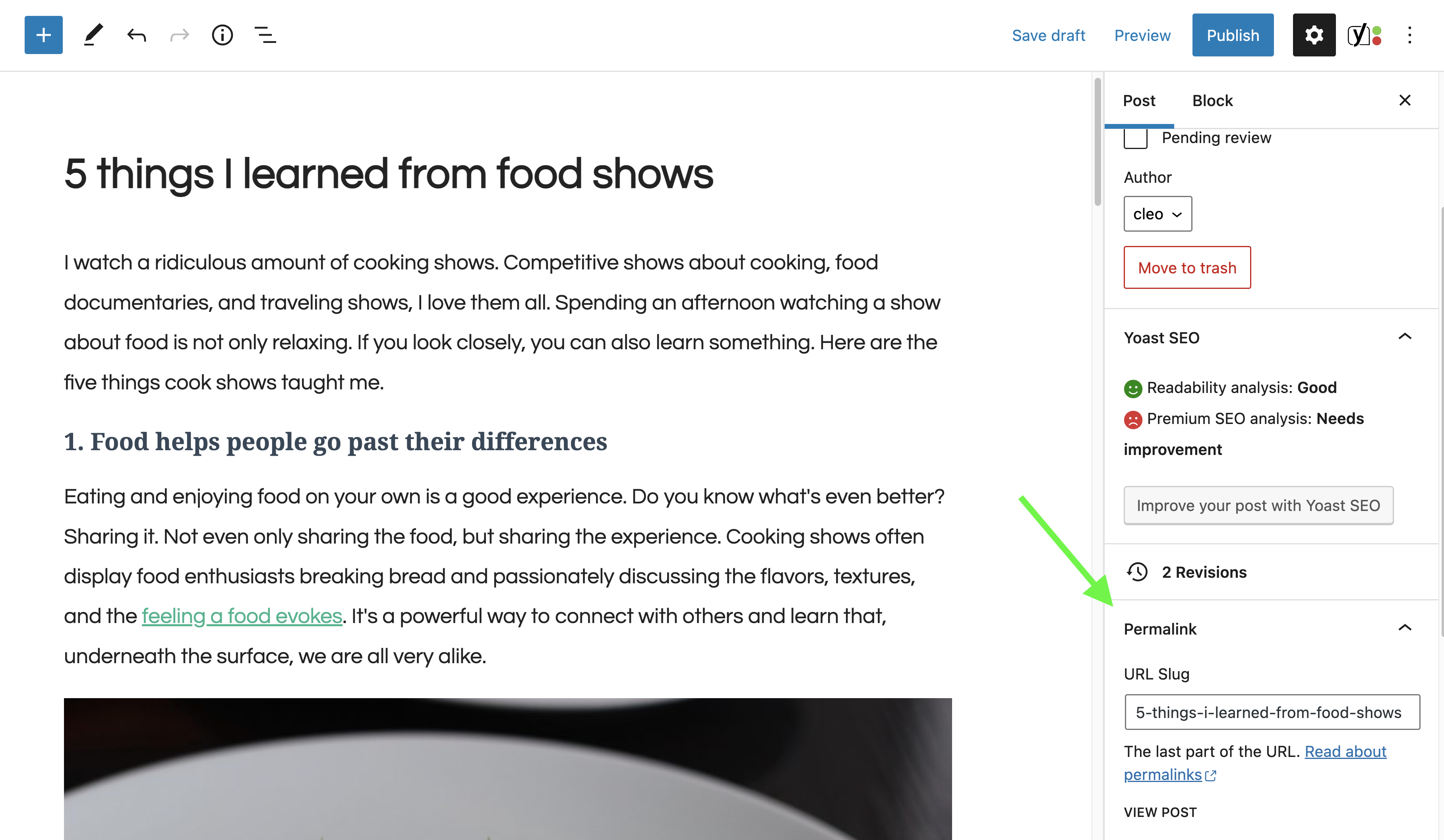
Note that this only works with the right permalink settings. You can edit the permalink settings in WordPress through Settings > Permalinks. We recommend choosing an option in which the URL contains relevant words, as this provides users and search engines with more information about the page than an ID or parameter would.
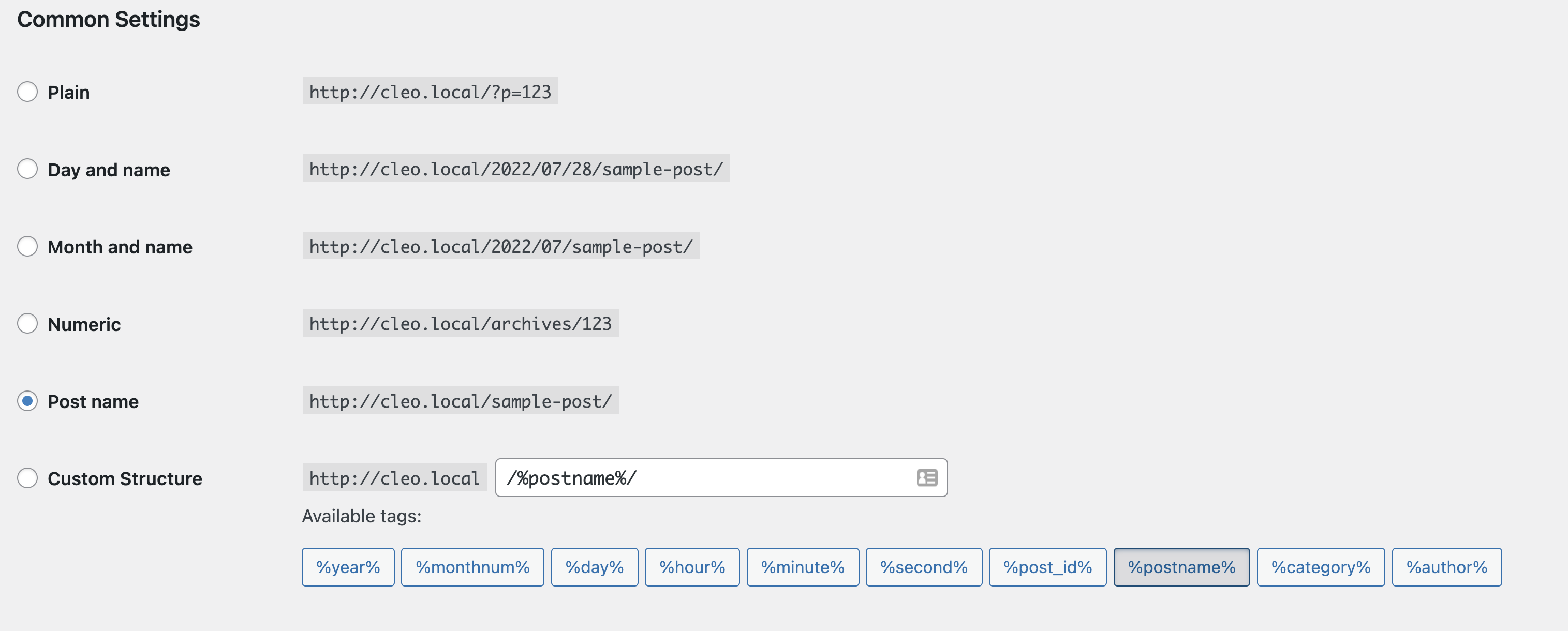
Note: don’t just change your permalink settings once your site is already online. This could cause all kinds of trouble.
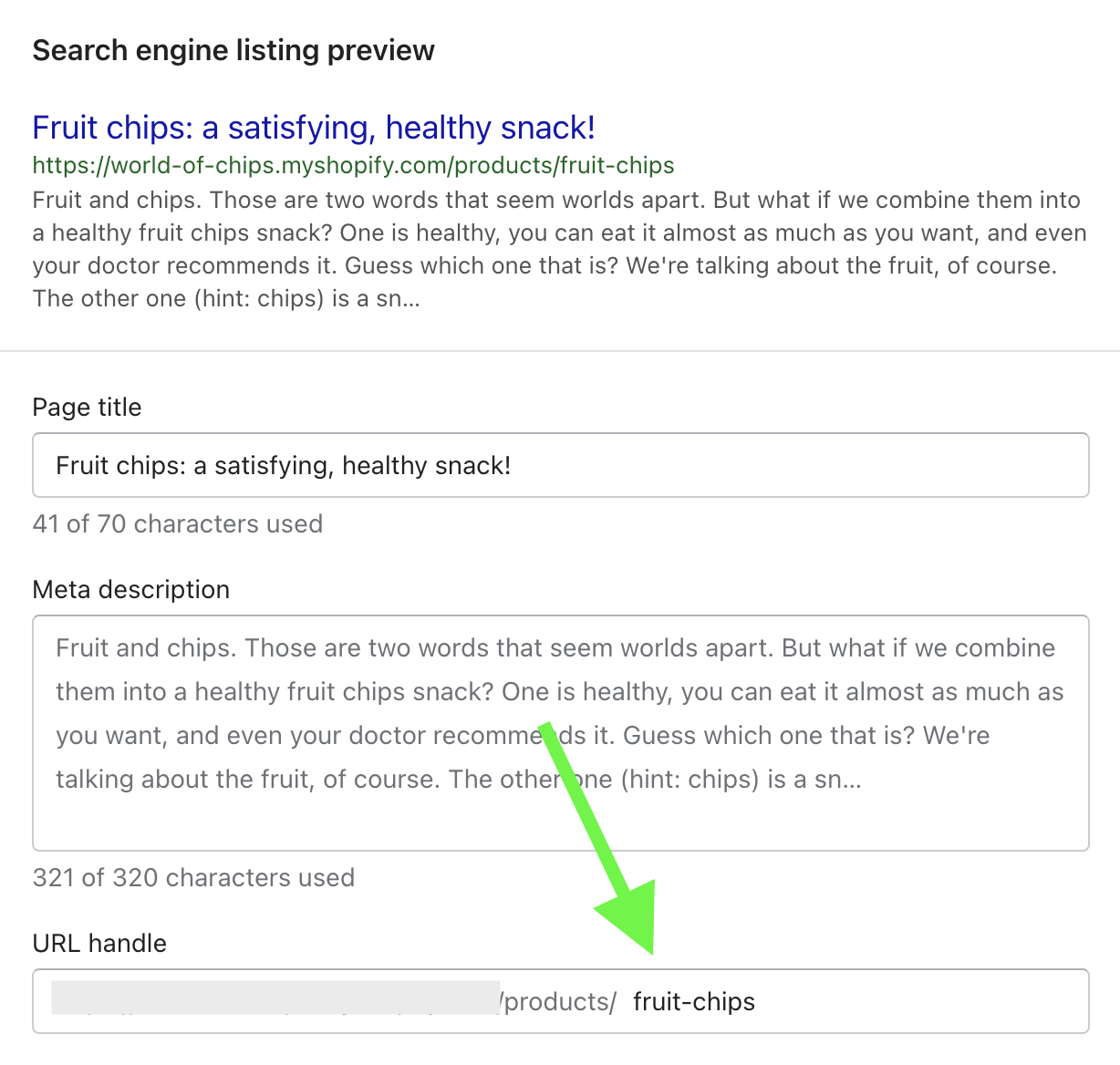
There are two ways to edit a slug in Shopify: You can either use Shopify’s ‘Search engine listing preview’ function, or you can use the Google Preview tool in Yoast SEO for Shopify instead.
To edit a slug using the built-in Shopify function, you’ll first need to click on ‘Edit website SEO’ to open the Search engine listing preview options. From there, you can easily adjust your slug as necessary. Note: Shopify calls the slug the ‘handle’ instead, but it’s exactly the same thing!
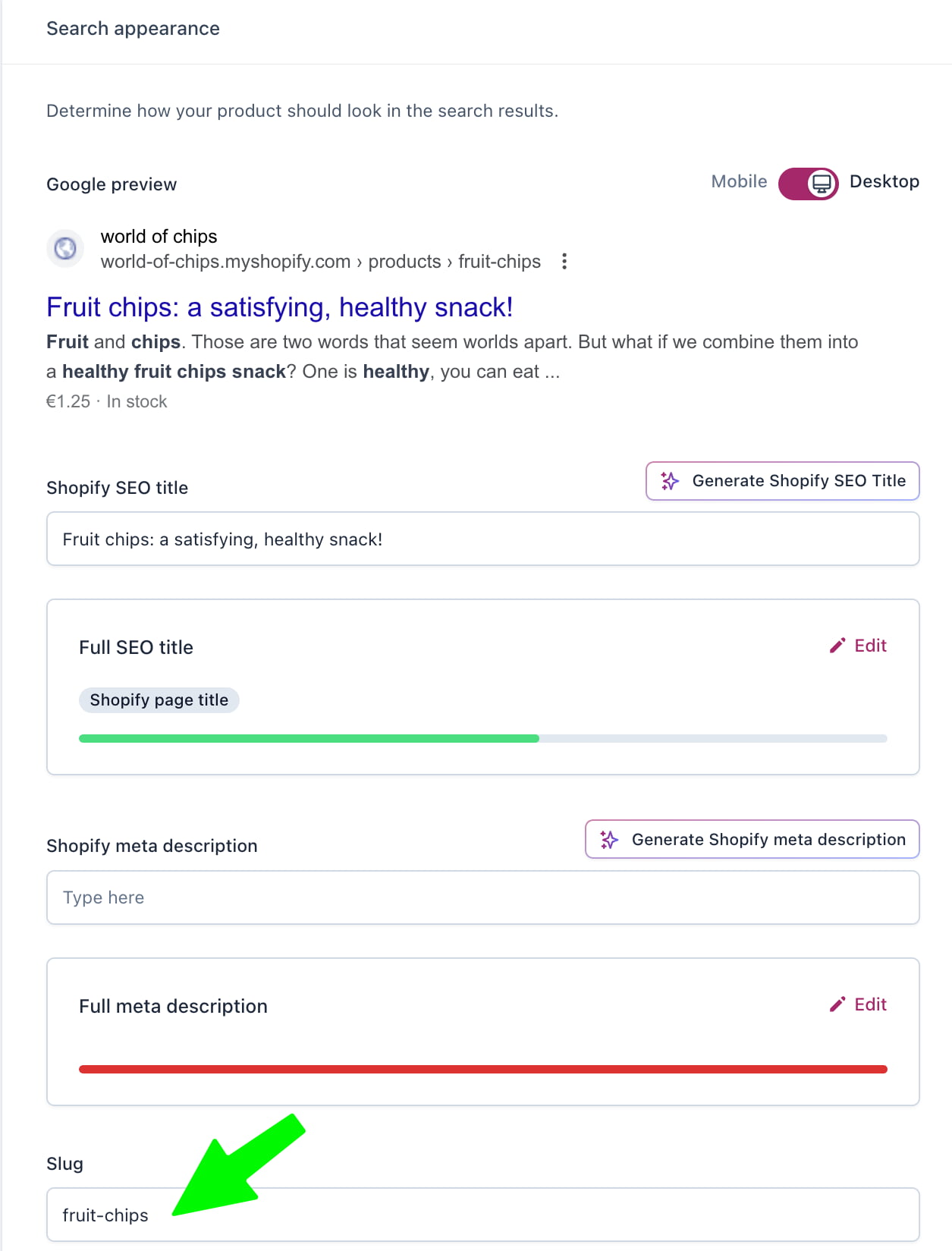
Alternatively, if you’re editing your Shopify page with Yoast SEO, all you need to do is scroll down to the search appearance section and you’ll see a field to enter a new slug:
What is a slug on a website?
A slug on a website serves as a unique identifier for each page or post. Think of it as the digital address that tells browsers and search engines exactly where to find specific content. Every page on your website needs its own unique slug to avoid confusion and ensure proper indexing.
For instance, if you’re running a recipe blog, you might have slugs like:
- /chocolate-chip-cookies
- /homemade-pizza-dough
- /best-pasta-carbonara
Each slug clearly describes what visitors will find on that page.
What is a WordPress slug?
A WordPress slug (or slug in WordPress) functions exactly the same way, but WordPress has built-in features that make creating and editing slugs straightforward. When you create a new post or page in WordPress, the system automatically generates a slug based on your title. However, as you’ll learn in this guide, WordPress’s default slugs often need optimization for better SEO performance.
What is an SEO slug?
An SEO slug is a URL slug that’s been optimized specifically for search engines while remaining user-friendly. The difference between a regular slug and an SEO slug lies in strategic optimization:
Regular slug:
- /new-post-2025
- /?p=123
- /check-out-this-amazing-article-about-chocolate
SEO slug:
- /chocolate-cake-recipe
- /wordpress-seo-tips
- /best-running-shoes-2025
An effective SEO slug includes your target keywords, stays concise, removes unnecessary words, and clearly describes the page content. Search engines use slugs as one indicator of what your page is about, so optimizing them can improve your rankings for target keywords.
With the rise of AI-powered search platforms like ChatGPT and Google’s AI Mode, having clear, descriptive SEO slugs becomes even more important. AI systems rely on structured, readable URLs to understand and recommend content accurately.
How WordPress and Yoast SEO helps with slugs
Many beginners wonder about slug generators and whether they need special tools to create optimized slugs. The good news is that WordPress and Yoast SEO already include powerful slug generation features.
WordPress automatic slug generation
WordPress acts as a built-in slug generator by automatically creating slugs from your post titles. When you type “10 Best WordPress Plugins for 2025” as your title, WordPress generates the slug: /10-best-wordpress-plugins-for-2025
However, WordPress’s automatic generation doesn’t always produce the most SEO-friendly results. That’s where manual optimization and Yoast SEO come in.
Yoast SEO slug optimization
Yoast SEO takes slug generation to the next level by:
- Analyzing your slug: The plugin checks whether your focus keyphrase appears in your slug and alerts you if it’s missing
- Providing real-time feedback: As you edit your slug, Yoast shows you whether it’s optimized for your target keywords
- Suggesting improvements: The SEO analysis panel highlights when your slug is too long, missing keywords, or could be improved
- Preventing common mistakes: Yoast warns you if you’re reusing a slug that already exists on another page
If you’re using Yoast SEO Premium or the Yoast SEO AI+ package, you benefit from enhanced slug optimization features integrated with other AI-powered tools like title generation and content analysis. The AI+ package (which includes AI Brand Insights to track your brand in AI search platforms and WooCommerce SEO for ecommerce optimization) ensures your entire content strategy, including slugs, works together for maximum visibility.
Ready to take your SEO to the next level?
Explore Yoast SEO Premium or the Yoast SEO AI+ package for advanced features including AI-powered optimization, redirect management, and 24/7 expert support.
Why are URL slugs important for SEO?
Crafting a compelling slug for your page or post can positively impact your SEO. With the evolution of search algorithms and the rise of AI-powered search experiences, optimized slugs are more importantthan ever. Here’s why:
1. Include your keyword
The slug is one of the indicators Google uses to determine what a page is about. When you change your slug to include words you really want to rank for, you’re sending clear signals to search engines about your content’s focus.
For example, if you’re targeting “WordPress SEO tips,” a slug like /wordpress-seo-tips is far more effective than /post-123 or /new-article-2025.
With AI search platforms like ChatGPT and Perplexity increasingly recommending content, having keyword-rich slugs helps these AI systems understand and categorize your content accurately. This improves your chances of being cited in AI-generated answers.
2. Create user-friendly URL slugs
Picture a results page: you’ll see many URLs about a particular topic. So, you need to make sure your slug is in line with what people expect to see.
For example, our main article on WordPress SEO has the URL yoast.com/wordpress-seo, which is very on point. People are much more likely to click on that than on yoast.com/?p=607, even though that’s the URL WordPress creates by default.
User-friendly slugs improve:
- Click-through rates (CTR): Clear slugs entice more clicks from search results
- Trust and credibility: Professional-looking URLs build confidence
- Shareability: Clean URLs are easier to share on social media and messaging apps
- Memorability: Simple slugs are easier for users to remember and type directly
Find out more about creating SEO-friendly URLs »
3. Mobile-first indexing and Core Web Vitals
Google indexes and evaluates your site based on its mobile version first. Short, simple URL slugs make mobile browsing easier because they fit better on small screens, are easier to scan, and add less overhead when loading pages.
Since Google uses Core Web Vitals to measure user experience, cleaner URLs can give you a small extra edge. They won’t transform your rankings overnight, but they remove friction for both visitors and search engines, especially when they’re brief, relevant, and free of unnecessary words.
What does the keyphrase in slug assessment in Yoast SEO do?
Your article or page should have an easy-to-remember, focused and SEO-friendly URL. That’s why, to improve your URL, the Yoast SEO plugin checks how you’ve fitted in your main focus keyphrase and makes suggestions to improve it.
When you set a focus keyphrase in Yoast SEO, the plugin analyzes whether that keyphrase appears in your slug. If it’s missing, you’ll see an orange or red indicator in your SEO analysis panel with feedback like: “The focus keyphrase does not appear in the URL for this page.”
This assessment helps ensure your slug aligns with your content’s primary topic, making it easier for both search engines and users to understand what your page is about.
How to fix it: Simply edit your slug to include your focus keyphrase (or a variation of it) naturally. Yoast will automatically re-analyze and turn the indicator green once your slug is optimized.
How to optimize your slug in WordPress for SEO
What do you need to consider when crafting the right slug for your post or page? Let’s go over the six steps of optimizing it in WordPress:
- Include your focus keyphrase
This is the foundation of an optimized slug. Your focus keyphrase should always appear in the slug. This immediately makes it clear to your audience and search engines what your page is about.
Example:
Focus keyphrase: WordPress SEO tips
Optimized slug: /wordpress-seo-tips
If your keyphrase isn’t in the slug, the SEO analysis in the Yoast plugin will show you this message:
- Think about function words
The slug that’s generated by default may include function words like “a”, “the”, “and”, “of”, and “to”. Sometimes, you might need those to clarify what your page is about. Usually, however, you can leave them out.
Example:
Original title: How to create the best SEO strategy
WordPress default slug: /how-to-create-the-best-seo-strategy
Optimized slug: /create-best-seo-strategy or /best-seo-strategy
Removing function words makes your slug shorter and more focused without losing meaning.
You can read more about this in our WordPress SEO article. - Add focus and remove unnecessary words
You shouldn’t just filter out function words, but every word you don’t need. In the case of this post, WordPress automatically created the slug “what-is-a-slug-and-how-to-optimize-it” (based on the permalink settings in WordPress). That’s quite long, so we manually reduced it to “slug”.
However, ensure that your slug still makes sense. Balance of brevity with clarity. A slug like /SEO might be too vague if you have multiple SEO-related posts.
Remember: You can use a slug only once, so use it for the right page. For example, if we want to write another (but different) post about slugs in the future, we can’t reuse this slug. - Keep it short and descriptive
As we’ve mentioned, the URL of your page is sometimes shown in Google’s search results and may influence whether your audience decides to click your snippet. You don’t have a lot of room to play with, so think carefully about the specific words you want to include.
SEO slug best practice: Aim for slugs between 3-5 words (roughly 30-50 characters). This length is:
1. Easy to read at a glance
2. Displays fully in search results and social shares
3. Mobile-friendly for smaller screens
4. Memorable for users who might type URLs directly - Use lowercase letters only
Always use lowercase letters in your slugs. WordPress automatically converts uppercase to lowercase, but it’s good practice to be consistent from the start.
Use hyphens (-) to separate words, not underscores (_) or spaces. Search engines treat hyphens as word separators, making your slug easier to read and index.
Example:
Good: /wordpress-seo-guide
Bad: /WordPress_SEO_Guide or /wordpressseoguide ers. - Make it permanent (or change carefully)
Once you publish a page and it starts ranking in search engines, avoid changing the slug unless absolutely necessary. Changing a slug changes the URL, which can:
– Break existing links to your content
– Lose accumulated SEO value
– Confuse users who bookmarked the old URL
– Create 404 errors if not properly redirected
If you must change a slug, always set up a 301 redirect from the old URL to the new one. Yoast SEO Premium includes a redirect manager that simplifies this process. - Avoid keyword stuffing
While including your focus keyphrase is important, don’t try to cram multiple keywords into one slug. This creates long unnatural URLs that hurt user experience and may be viewed as spammy by search engines.
Example:
Keyword-stuffed (bad): /best-wordpress-seo-plugin-yoast-seo-guide-tutorial-2025
Optimized (good): /best-wordpress-seo-plugin or /yoast-seo-guide
SEO slug best practice: Focus on one primary keyword per slug and let your content, headings, and meta descriptions handle secondary keywords. - Consider user intent and readability
Search engines are increasingly focused on user experience and AI systems analyzing content context. Your slug should clearly communicate what users will find on your page.
Ask yourself:
– Does this slug accurately describe my content?
– Would a user understand what they’re clicking on?
– Is it conversational enough for voice search?
– Does it match search intent (informational, transactional, navigational)?
Voice search optimization: With voice assistants becoming more popular, slugs that sound natural when spoken aloud perform better. Compare:
/how-to-bake-bread (natural, voice-search-friendly)
/bake-bread-guide-tutorial (less conversational)
Optimizing slugs with Yoast SEO
Yoast SEO makes implementing these SEO slug best practices effortless. Here’s how the plugin helps you optimize slugs:
Real-time slug analysis
As you edit your slug in the Yoast SEO panel, the plugin analyzes it against your focus keyphrase and provides instant feedback. You’ll see whether your slug:
- Contains your focus keyphrase
- Is an appropriate length
- Uses proper formatting
- Conflicts with existing URLs
Integration with AI features
If you’re using Yoast SEO Premium or the Yoast SEO AI+ package, slug optimization works seamlessly with other AI-powered features:
- AI Generate: Creates optimized titles and meta descriptions that complement your slug strategy
- AI Optimize: Ensures your content matches the promise made in your slug
- AI Brand Insights: Tracks how your optimized URLs perform in AI search platforms like ChatGPT, helping you understand whether your slug strategy translates to AI visibility
WooCommerce slug optimization
For ecommerce sites, the Yoast SEO AI+ package includes WooCommerce SEO, which automatically optimizes product slugs for better search visibility. This is especially valuable when managing large product catalogs where manual slug optimization would be time-consuming.
Common slug mistakes to avoid
Even with Yoast SEO’s guidance, some common slug mistakes can hurt your SEO. Here’s what to avoid:
- Using default WordPress slugs
Never leave WordPress’s default slugs like /?p=123 or /post-2025-11-12. These provide zero SEO value and confuse users
- Creating duplicate slugs
Each slug must be unique across your entire site. Yoast SEO prevents duplicate slugs, but always double-check when editing
- Changing slugs on established content
As mentioned earlier, changing slugs on pages that already rank can harm your SEO. If you must change them, implement proper 301 redirects
- Using special characters
Avoid special characters like ?, %, #, &, or @ in slugs. Stick to letters, numbers, and hyphens
- Making slugs too long
Slugs longer than 60 characters often get truncated in search results and overwhelm users. Keep them concise
Conclusion
Understanding what a slug is, whether you’re asking about a WordPress slug, an SEO slug, a slug URL, or a slug on a website, is fundamental to effective SEO. By following these SEO slug best practices, you’ll create user-friendly, search-engine-optimized URLs that improve your rankings and click-through rates.
A smarter analysis in Yoast SEO Premium
Yoast SEO Premium has a smart content analysis that helps you take your content to the next level!
