

Noindex a post or page in WordPress, the easy way!

Some posts and pages should not show up in search results. To make sure they don’t show up, you should tell search engines to exclude them. You do this with a meta robots noindex tag. Setting a page to noindex makes sure search engines never show it in their results. Here, we’ll explain how easy it is to noindex a post in WordPress if you use Yoast SEO.
Why keep a post out of the search results?
Why would you NOT want a page to show up in the search results? Well, most sites have pages that shouldn’t show up in the search results. For example, you might not want people to land on the ‘thank you’ page you redirect people to when they’ve contacted you. Or your ‘checkout success’ page. Finding those pages in Google is of no use to anyone.
For those kinds of pages, you’re going to want to ‘noindex’ them.
What kinds of pages might I want to set to noindex?
Author archives on a one-author blog
If you are the only person writing for your blog, your author pages are probably 90% the same as your blog homepage. That’s not a valuable page, and might be considered to be duplicate content. To prevent this you can disable the author archive entirely – here’s how to enable or disable it easily with Yoast SEO. If, for some reason, you’d like to keep it on your site, but out of the search results, you can noindex it. Fortunately, with Yoast SEO, this is not very difficult either; just check how to noindex an author archive.
Certain (custom) post types
Sometimes a plugin or a web developer adds a custom post type that you don’t want to be indexed. For example, a music blog might want to have artist and album posts indexed, but not individual songs.
Thank you pages
These pages are typically thin on content and don’t provide a good experience as an entry into the site. If you’re using analytics on your site or running ads, entrances to these pages might also trigger conversions and skew your data!
Admin and login pages
Most login pages shouldn’t be in Google. Luckily, if you are running WordPress, you’re safe as your site’s login page is automatically noindex’d.
Internal search results
Internal search results are pretty much the last pages Google would want to send its visitors to. If you want to ruin a search experience, you link to other search pages, instead of an actual result. But the links on a search result page are still very valuable, you definitely want Google to follow them. So, all links should be followed, and the robots meta setting should be:
<meta name="robots" content="noindex, follow">
Yoast SEO makes sure your internal search pages are set to noindex by default. It’s one of Yoast SEO’s hidden features. This is not an editable setting, because it’s simply how it should be done according to the Google Guidelines, and we fully agree with them on this.
For developers only: If you do want to change this, this can be done by using one of our filters. An example can be found here.
How to set a post to noindex with Yoast SEO
Setting a post or page to noindex is simple when you’re running Yoast SEO. Below your post, in the Yoast SEO meta box, just click on the Advanced tab:
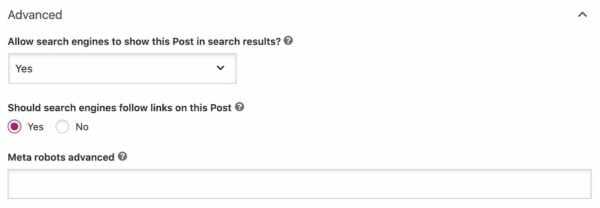
On the Advanced tab, you’ll see some questions. The first is: “Allow search engines to show this post in search results?” If you select ‘Yes’, your post can show up in Google. If you select ‘No’, you’ll set the post to noindex . This means it won’t show up in the search results.

The default setting of the post – in this case, Yes – is the setting you’ve selected for this post type in the Search Appearance tab of Yoast SEO. If you want to prevent complete sections of your site from showing up in Google, you can set that there. This is further explained in Edwin’s post: Show x in search results?.
Please note that if the post you’re setting to noindex is already in the search results, it might take some time for the page to disappear. The search engines will first have to re-crawl the page to find the noindex tag. And do not noindex posts frivolously: if they were getting traffic before, you’re losing that traffic.
Were you considering to use the robots.txt file to keep something out of the search results? Read why you shouldn’t use the robots.txt file for that.
Do links on noindexed pages have value?
When you set a post to noindex, Yoast SEO automatically assumes you want to set it to noindex, follow. This means that search engines will still follow the links on those pages. If you do not want the search engines to follow the links, your answer to the following question should be ‘No’:

This will set the meta robots to nofollow, which will change the search engines’ behavior. In theory, this means that they’ll ignore all the links on the page, although Google may still crawl them in order to discovery new URLs.
Since Yoast SEO 14.4, you can also set individual links to nofollow in the block editor. You can even mark a commercial link as sponsored, which automatically adds a nofollow attribute as well. Simply click on the link and adjust the settings for that particular link.
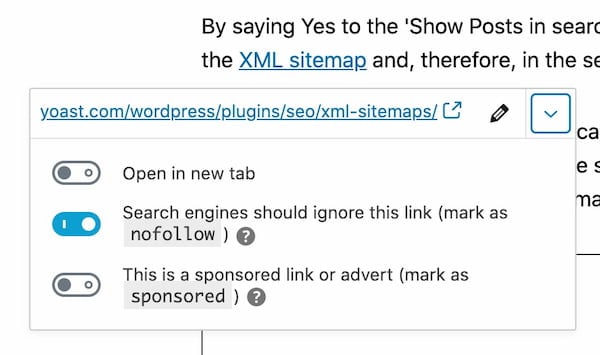
nofollow in the WordPress block editorPS. Did you noindex a post or page in WordPress while you didn’t mean to? No worries, as you can fix an accidental noindex easily!
Read more: The ultimate guide to the meta robots tag »

This was written in June 2020 yet there is no advanced tab on my posts or pages edit section. Can’t find the advanced tab, or an option to disable a google search for a page anywhere in wordpress with Yoast installed. Any ideas?
Hi Cameron, sorry to hear that. This could have something to do with your user role. Only editors and administrators can see and use the Advanced tab in Yoast SEO. Read more about it here: https://yoast.com/help/security-no-advanced-settings-for-authors/
Good luck!
i am using yeost seo for the 1st time…and i am checking how much time it takes to change meta tag and meta description..lets hope that it changes fast.
Hi there! Welcome and thanks for using our plugin. Depending on how often your site is crawled, it can take up to a week for Google to index the changes.
This page can tell you more about it: https://yoast.com/help/my-meta-descriptions-arent-showing-up-in-the-search-result-pages/
I have added yeost seo plugin and its been 3 days but my meta tag and meta description are not showing on google..instead my developer link is getting visible withe my brand name which i dont want to show….
Hi there! Thanks for using our plugin :) Depending on how often your site is crawled, it can take up to a week for Google to index the changes.
As for your developers link, you can keep this out of the search results by adding a noindex to it. Read more about it here: https://yoast.com/which-pages-noindex-or-nofollow/
I am getting green signal in SEO Analysis but Unable to get green on in readability analysis can you give me clear guidance how to get green signal ? Very tough time i am having.
Hi Ibrahim, nice work on getting a green bullet on your SEO analysis! This article will help you understand the readability analysis and what improvements you can make to your text more readable: https://yoast.com/yoast-seo-readability-analysis/
Lots of luck!
Yoast SEO have really solved a great problem of Noindex a post or page in WordPress issue for Publisher. I hope this step could help out for better search results on the search engine.
Thanks, Jacobs. This feature can definitely help you rank with the right content, by excluding the posts or pages you don’t want showing up in the search results!
But where is the advanced tab? Unable to locate.
Hi John, you should be able to find it in the Yoast meta box below your post. It’s the last item. It might be turned off though if you’re an author: https://yoast.com/help/security-no-advanced-settings-for-authors/ . In that case, please check with your site’s admin!
This is a wonderful post. However, I have a doubt which I am not able to get proper clarification. If I use noindex tag in any particular page, does it mean that the crawlers will not index my page but it will follow the page, right? Could you please clarify it. I am lost in this part.
Hi Porikshit. Indeed, they won’t index your page but they can still visit it. And if haven’t changed the default setting, crawlers will also still follow the links. If you make your links nofollow on this page, crawlers won’t follow these.
Hi, thanks, this was interesting. So, if I switch a page to ‘noindex’, does that mean the SEO ranking no longer matters and I don’t need to pay attention to it for the pages that are not “followed” by the robots…?!
Hi Sitara. If you don’t want a page to appear in the search engines you should noindex it in Yoast SEO. Don’t block crawlers in robots.txt as you need them to see the noindex you added. For links, you can leave them on the default setting — i.e. follow — or give these a nofollow, so crawlers won’t follow these.
This is an excellent feature in Yoast SEO, but although the content is now hidden from Google it still appears in WordPress search (the built-in internal search). Any chance that Yoast SEO will prevent that too?
Thanks, David. Good question! But we’ll have to disappoint you; that won’t be a feature. It’s not as much related to SEO and in some cases, you’d like to do one but not the other. There are other plugins who can help you with that though!