

Canonical URLs: definitive guide to canonical tags

Imagine telling someone that www.mysite.com/blog/myarticle and www.mysite.com/myarticle are actually the same page. To you, they’re the same, but to Google, even a small difference in the URL makes them separate pages. That is where the canonical tag steps in. In this guide, we will walk you through what a canonical URL is, how URL canonicalization works, when to use it, and which mistakes to avoid so that search engines always understand your preferred page version.
Key takeaways
- A canonical URL is the main version of a webpage that you want search engines to index, avoiding duplicate content issues
- The canonical tag, placed in the HTML head, signals which URL is the preferred version to search engines
- Using canonical URLs helps consolidate link equity, improves crawl efficiency, and enhances user experience
- Implement canonical tags in scenarios like duplicate content, URL versions, and syndicated content to inform search engines which URL to prioritize
- Yoast SEO can automate canonical URL handling, reducing manual errors and ensuring consistency across your site
What is a canonical URL?
A canonical URL is the main, preferred, or official version of a webpage that you want search engines like Google to crawl and index. It helps search engines determine which version of a page to treat as the primary one when multiple URLs lead to similar or duplicate content. As a result, it avoids duplicate content and protects your SEO ranking signals.
All of the following URLs can show the same page, but you should set only one as the canonical URL:
https://www.mysite.com/product/shoeshttps://mysite.com/product/shoes?ref=instagramhttps://m.mysite.com/product/shoeshttps://www.mysite.com/product/shoes?color=black
What is a canonical tag?
A canonical tag (also called a rel="canonical" tag) is a small HTML snippet placed inside the section of a webpage to tell search engines which URL is the canonical or master version. It acts like a clear label saying, “Index this page, not the others.” This prevents duplicate content issues, consolidates ranking signals, and supports proper canonicalization across your site.
Here’s an example of a canonical tag in action:
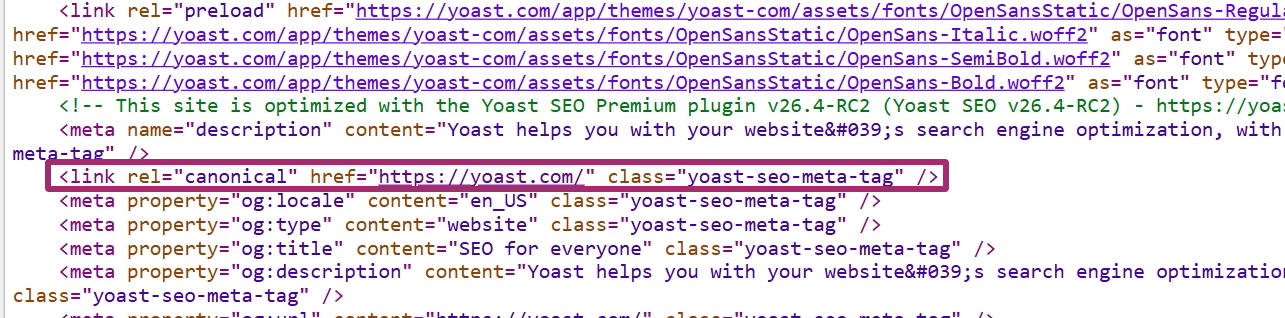
This tag should be placed on any alternate or duplicate versions that point back to the main page you want indexed.
How does URL canonicalization work?
Canonicalization is the process of selecting the representative or canonical URL of a piece of content. From a group of identical or nearly identical URLs, this is the version that search engines treat as the main page for indexing and ranking.
Once you understand that, canonicalization becomes much easier to visualize. Think of it as a three-step workflow.
How the canonicalization process works
Here’s how the canonicalization works:
Search engines detect duplicate or similar URLs
Google groups URLs that return the same (or almost the same) content. These could come from:
- URL parameters
- HTTP vs. HTTPS versions
- Desktop vs. mobile URLs
- Filtered or sorted pages
- Regional versions
- Accidental duplicates like staging URLs
You signal which URL is canonical
You can guide search engines using canonical signals like:
- The
rel="canonical"tag - 301 redirects
- Internal links pointing to one preferred version
- Consistent hreflang usage
- XML sitemaps listing the preferred URL
- HTTPS over HTTP
The strongest and clearest hint is the canonical tag placed in the head of the page.
Google selects one canonical URL
Google uses your signals, along with its own evaluation, to determine the primary URL. While Google typically follows canonical tags, it may override them if it detects stronger signals such as redirects, internal linking patterns, or user behaviour.
Once Google settles on the canonical URL, search engines will:
- Consolidate link equity into the canonical page
- Index the canonical URL
- Treat all non-canonical URLs as duplicates
- Reduce crawl waste
- Avoid showing similar pages in search results
Canonical tags are a hint, not a directive. Google may still distribute link equity differently if it deems the canonical tag unreliable.
Reasons why canonicalization happens
Canonicalization becomes necessary when different URLs lead to the same content. Some common reasons are:
Region variants
For example, you have one product page for the USA and one for the UK, like: https://example.com/product/shoes-us and https://example.com/product/shoes-uk.
If the content is almost identical, use one canonical link or a clear regional setup to avoid confusion.
Pro tip: For regional variants, combine canonical tags with hreflang to specify language/region targeting.
Device variants
When you serve separate URLs for mobile and desktop, such as: https://m.example.com/product/shoes and https://www.example.com/product/shoes.
Canonical tags help search engines understand which URL is the primary version.
Protocol variants
Sorting and filtering often create many URLs that show similar content, like:
https://example.com/shoes?sort=price or https://example.com/shoes?color=black&size=7
A single canonical URL, such as https://example.com/shoes, tells search engines which page should carry the main ranking signals.
Also read: Optimizing ecommerce product variations for SEO and conversions
Accidental variants
Maybe a staging or demo version of the site is left crawlable, or both https://example.com/page and https://example.com/page/ return the same content
Canonical tags and proper URL canonicalization help avoid these unintentional duplicates.
Some duplicate content on a site is normal. The goal of canonicalization in SEO is not to eliminate every duplicate, but to show search engines which URL you want them to treat as the primary one.
In practical aspects
In practice, canonicalization comes down to a few key things:
Placement
The canonical tag is placed in the head of the HTML, for example:
link rel="canonical" href="https://www.example.com/preferred-page" /
Each page should have at most one canonical tag, and it should point to the clean, preferred canonical URL.
Identification
Search engines examine several signals to determine the canonical version of a page. The rel="canonical" tag is important, but they also consider 301 redirects, internal links, sitemaps, hreflang, and whether the page is served on HTTPS. When these signals are consistent, it is easier for Google to pick the right canonicalized URL.
Crawling and indexing
Once search engines understand which URL is canonical, they primarily crawl and index that version, folding duplicates into it. Link equity and other signals are consolidated to the canonical page, which improves stability in rankings and makes your canonical tag SEO setup more effective.
The main rule for canonicalization is simple: if multiple URLs display the same content, choose one, make it your canonical URL, and clearly signal that choice with a proper canonical tag.
Why do canonical tags matter for SEO?
Google’s John Mueller puts it simply: ‘I recommend doing this kind of self-referential rel=canonical because it really makes it clear for us which page you want to have indexed or what this URL should be when it’s indexed.’
And that’s exactly why canonical tags matter; they tell search engines which version of a page is the real one. This keeps your SEO signals clean and prevents your site from competing with itself.
They’re important because they:
- Avoid duplicate content issues: Canonical tags inform Google which URL should be indexed, preventing similar or duplicate pages from confusing crawlers or diluting rankings
- Consolidate link equity: Canonicalization works similarly to internal linking; both are techniques used to direct authority to the page that matters most. Instead of splitting ranking signals across duplicate URLs, all information is consolidated into a single canonical URL
- Improve crawl efficiency: Search engines don’t waste time crawling unnecessary duplicate pages, which helps them discover your important content faster
- Enhance user experience: Users land on the correct, up-to-date version of your page, not a filtered, parameterized, or accidental duplicate
When to use canonical tags?
Canonical tags are useful in various everyday SEO scenarios. Here are the most common scenarios where you’ll want to use a rel=canonical tag to signal your preferred URL.
URL versions
If your page loads under multiple URL formats, with or without “www,” HTTP vs. HTTPS, and with or without a trailing slash, search engines may index each version separately. A canonical tag helps you standardize the preferred version so Google doesn’t treat them as separate pages.
Duplicate content
Ecommerce sites, blogs with tag archives, and category-driven pages often generate duplicate or near-duplicate content by design. If the same product or article appears under multiple URLs (filters, parameters, tracking codes, etc.), canonical tags help Google understand which canonical URL is the authoritative one. This prevents cannibalization and protects your canonical SEO setup.
Also read: Ecommerce SEO: how to rank higher & sell more online
Syndicated content
If your content is republished on partner sites or aggregators, always use a canonical tag that points back to your original version. This ensures your page retains the ranking signals, not the syndicated copy, and search engines know exactly where the content was originally published.
If syndication partners don’t honor your canonical tag, consider using noindex or negotiating link attribution.
Paginated pages
Long lists or multi-page articles often create a chain of URLs like /page/2/, /page/3/, and so on. These pages contribute to the same topic but shouldn’t be indexed individually. Adding canonical tags to the paginated sequence (typically pointing to page 1 or a “view-all” version) helps consolidate indexing and keeps rankings focused on the primary page.
Pro tip: For paginated content, use self-referencing canonicals (each page points to itself) unless you have a ‘view-all’ page that loads quickly and is crawlable.
Also read: Pagination & SEO: best practices
Site migrations
When you change domains, restructure URLs, or move from HTTP to HTTPS, using consistent canonical tags helps reinforce which pages replace the old ones. It signals to search engines which canonicalized URL should inherit ranking power. During migrations, canonical tags act as a safety net to prevent duplicate versions from competing with each other.
Implementing canonical URLs and canonical tags
URL canonicalization is all about giving search engines a clear signal about which version of a page is the preferred or canonical URL. You can implement it in several simple steps.
Using the rel=”canonical” tag
The most common way (as shown multiple times in this blog post) to set a canonical URL is by adding a rel="canonical" tag in the head section of your page. It looks like this:
link rel="canonical" href="https://www.example.com/preferred-url"/
This tag tells search engines which URL should carry all ranking signals and appear in search results. Ensure that every duplicate or alternate version links to the same preferred URL, and that the canonical tag is consistent throughout the site.
You can also use rel="canonical" in HTTP headers for non-HTML content such as PDFs. This is helpful when you cannot place a tag in the page itself.
Pro tip: While supported for PDFs, Google may not always honor canonical HTTP headers. Use them in conjunction with other signals (e.g., sitemaps).
Also, ensure the canonical tag is as close to the top of the head section as possible so that search engines can see it early. Each page should have only one canonical tag, and it should always point to a clean, accessible URL. Avoid mixing signals. The canonical URL, your internal links, and your sitemap entries should all match.
Setting a preferred domain in Google Search Console
Google lets you choose whether you prefer your URLs to appear with or without www. Setting this preference helps reinforce your canonical signals and prevents search engines from treating www and non-www versions as different URLs.
To set your preferred domain, open your property in Google Search Console, go to Settings, and choose the version you want to treat as your primary domain.
Redirects (301 redirects)
A 301 redirect is one of the strongest signals you can send. It permanently informs browsers and search engines that one URL has been redirected to another and that the new URL should be considered the canonical URL.
Use 301 redirects when:
- You merge duplicate URLs
- You change your site structure
- You migrate to HTTPS
- You want to consolidate link equity from outdated pages
Of course, redirects replace the old URL, while canonical tags suggest a preference without removing the duplicate.
With Yoast SEO Premium, you can manage redirects effortlessly right inside your WordPress dashboard. The built-in redirect manager feature of the SEO plugin helps you avoid unnecessary 404s and prevents visitors from landing on dead ends, keeping your site structure clean and your user experience smooth.
A smarter analysis in Yoast SEO Premium
Yoast SEO Premium has a smart content analysis that helps you take your content to the next level!
Additional canonicalization techniques
There are a few more ways to support your canonical setup.
- XML sitemaps: Always include only canonical URLs in your sitemap. This helps search engines understand which URLs you want indexed
- Hreflang annotations: For multi-language or multi-region sites, hreflang tags help search engines serve the correct regional version while still respecting your canonical preference
- Link HTTP headers: For files like PDFs or other non-HTML content, using a
rel="canonical"HTTP header helps you specify the preferred URL server-side
Each of these methods reinforces your canonical signals. When you use them together, search engines have a much clearer understanding of your canonicalized URLs.
Implementing canonicalization in WordPress with Yoast
Manually adding a rel="canonical" tag to the head of every duplicate page can be fiddly and error prone. You need to edit templates or theme files, keep tags consistent with your sitemap and internal linking, and remember special cases, such as PDFs or paginated series. Modifying site code and HTML is risky when you have numerous pages or multiple editors working on the site.
Yoast SEO makes this easier and safer. The plugin automatically generates sensible canonical URL tags for all your pages and templates, eliminating the need for manual theme file edits or code additions. You can still override that choice on a page-by-page basis in the Yoast SEO sidebar: open the post or page, go to Advanced, and paste the full canonical URL in the Canonical URL field, then save.
- Automatic coverage: Yoast automatically adds canonical tags to pages and archives by default, which helps prevent many common duplicate content issues
- Manual override: For special cases, use the Yoast sidebar > Advanced > Canonical URL field to set a custom canonical. This accepts full URLs and updates when you save the post
- Edge cases handled: Yoast will not output a canonical tag on pages set to noindex, and it follows best practices for paginated series and archives
- Developer options: If you need custom behavior, you can filter the canonical output programmatically using the wpseo_canonical filter or use Yoast’s developer API
- Cross-domain and non-HTML: Yoast supports cross-site canonicals, and you can use rel=”canonical” in HTTP headers for non-HTML files when needed
Both Yoast SEO and Yoast SEO Premium include canonical URL handling, and the Premium version adds extra automation and controls to streamline larger sites.
Must read: How to change the canonical URL in Yoast SEO for WordPress
rel=“canonical”: one URL to rule them all
Canonical URLs may seem like a small technical detail, but they play a huge role in helping search engines understand your site. When Google finds multiple URLs displaying the same content, it must select one version to index. If you do not guide that choice, Google will make the decision on its own, and that choice is not always the version you intended. That can lead to split ranking signals, wasted crawl activity, and frustrating drops in visibility.
Using canonical URLs gives you back that control. It tells search engines which page is the primary version, which ones are duplicates, and where all authority signals should be directed. From filtering URLs to regional variants to accidental duplicates that slip through the cracks, canonicals keep everything tidy and predictable.
The good news is that canonicalization does not have to be complicated. A simple rel=”canonical” tag, consistent URL handling, smart redirects, and clean sitemap signals are enough to prevent most issues. And if you are working in WordPress, Yoast SEO takes care of almost all of this automatically, so you can focus on creating content instead of wrestling with code.
At the end of the day, canonical URLs are about clarity. Show search engines the version that matters, remove the noise, and keep your authority consolidated in one place. When your signals are clear, your rankings have a solid foundation to grow.
