Using a CDN for your WordPress blog

This weekend I've begun testing the use of a CDN for yoast.com. The CDN I'm using is a product that will be available through VPS.net soon, but isn't just yet. So far, the speed improvement has been mind boggling. Just a few weeks ago, I could only get the front page of this site to load in about 7 seconds, measured by Pingdom, (check here, f/i). Now, the front page loads in about 2 seconds, and sometimes even less...

What is a CDN?

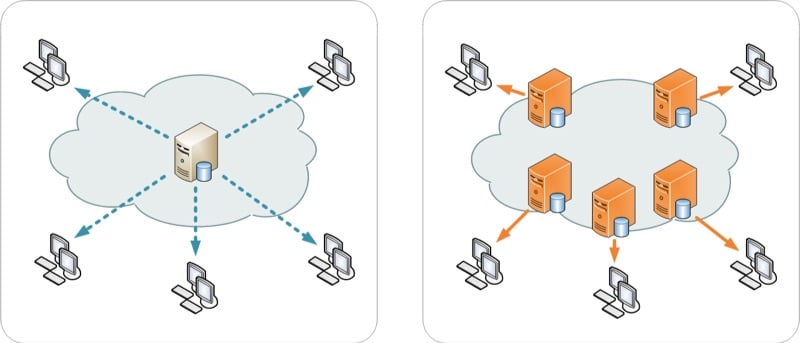
CDN stands for Content Delivery Network or Content Distribution Network. Basically, it's a bunch of highly optimized servers all across the world, with a bit of unique logic worked into them: you'll always hit the server that's closest to you. This leads to huge performance improvements for sites that have visitors from all across the world, like this one.

My images were coming from the US, which was better for like 50% of my readers but pretty slow for a lot of my European readers (about 35% of my readers are European). Now, for them, these images can come from the CDNs servers in London, Amsterdam or Frankfurt, whichever is closest to them.

CDN ConnectionsThe other servers of this CDN are, in North America: Ashburn, Atlanta, Chicago, Dallas, Los Angeles, New York, San Jose and Seattle. In Europe, as said; Amsterdam, Frankfurt and London, as well as Sydney Australia and Hong Kong and Tokyo in Asia. (There's actually a map on VI's cloud hosting page, another sister company of the same group of hosting providers). So my server now distributes its images, js and css files to those 15 servers, which in turn serve them out to you!

The CDN works with so called Pull URL's. This means you specify a directory on your server that it pulls all files from, which it then starts serving from the CDN. This allows for a few quite neat tricks, for starters, to serve all your uploaded files from the CDN quite easily, once you've done some WordPress stuff that I'll of course take care of for you.

I've moved several things onto the CDN:

  1. my themes image files
  2. my themes js files
  3. my themes css files
  4. the js files that come with WordPress that are not hosted by Google (eg. thickbox)
  5. all my uploaded files

Most of this was pretty easy, though there's some tricks involved in all of this. I'm working on moving those tricks into a plugin, which I'll try to release at the same time as when the CDN becomes available at VPS.net.

Who should be using a CDN?

Because it distributes your data across the globe, a CDN is beneficial for pretty much everyone. Larger blogs and sites with a lot of traffic, sites serving videos or other downloadable files benefit most, as it speeds up these downloads. Other sites that benefit are sites that are often on Digg or other huge sites - as it spreads the load across a network of servers, rather than just one.

The CDN has pretty cool live stats in the backend, that look like this:

cdn-bandwidth

I'm planning on integrating some of these statistics into the WordPress plugin I'm building for all this.

This CDN stuff must be expensive!

You were thinking that, right? Well, that's what I thought too. Turns out I'm wrong, they told me pricing for the CDN will be $0.05 a GB, pay-as-you-go, with a minimum purchase of $50. So you could buy 1TB for $50 and it could last anywhere up to even a year... And as one account can be used on multiple sites, if you put it on a whitelabel type domain, it'll be very useful to a pretty big group of people. It's also good to know that most good CDNs (including this one) don't charge for storage, just for bandwidth.

I'd love to know what you guys and girls think of the new speed, and whether this is something you can use too, let me know in the comments!

BTW. If you want an account like, now, and don't want to wait, let me know in the comments and I'll hook you up with the guys at VPS.net!

144 Responses to “Using a CDN for your WordPress blog”

  1. I would love an account to try it out. Been looking for something like this.

  2. Hi Joost,
    interesting article. So a CDN seems to be useful even for smaller sites and obviously it's affordable.

    I wonder if it could be used as a backup storage at the same time.
    Couldn't that be a nice additional benefit?

    Cheers,
    Axel

    • Axel,

      Good call. there are many people who try to (and/or, do) use a CDN as a backup tool - the key to remember here though is that the CDN will purge a file that's not had activity after a certain amount of time, but you don't know this time period. It basically keeps only the most active files.

      So for instance, if you had some files on there, that nobody had touched in a few weeks - they would be removed, and next times someone requested them they would be put back on the CDN.

      Which brings up one other point - the *very* first time a file is accessed on a CDN, it'll be more like normal speeds, as the CDN will need to pull the file from the server, after that is when you really see the speed enhancements.

      • Nick,

        Thanks for chiming in here. I have a question regarding the "first time" aspect of a file being accessed from the CDN. Is this the case per person or just site wide? In other words if it is per person it will obviously be determined based on what pages and files they need to access. If it is in general site wide couldn't you have a person internally from the site side surf the site so that all files are potentially in the CDN and ready to go? Please correct me if I am mistaken on any of these aspects.

        Thanks,

        Shuki

  3. Your website seems to be faster. I think I will give it a try too. I already had plan on using Google CDN for those common jQuery library but what you're talking about seems to be very interesting. Btw what's your impression with your hosting company?

  4. Can't wait to use such plugin on my WP-sites!

  5. Sounds interesting, I'll have to look it up and try it out :)

  6. Awesome. I wonder how Google sees this in terms of your source IP address. Not a big deal for you. But what about country specific websites?

    • Your website itself is still being served from the original location of choice, only the images and static content come from the CDN, so as far as google is concerned the CDN does not change the source of your site location :)

  7. I could REALLY use something like this on my site!

  8. Well well, that certainly sounds nice... Affordable, and your blog positively screams speed-wise now. I took a peek at the post on the VPS.net blog, and it seems that they have the U.S. and Europe pretty well covered.

    You said that you specify a directory to pull the files from to the CDN. Does it have to be one, or can you specify multiple ones? Would you, say, have to move all your theme's images and JavaScript into a new directory with your uploaded files?

  9. Hi Joost
    Great post BTW
    You should check out the getting started videos I have compiled specifically for this over at supportcasts web site The yare in 2 parts , jus think of them as a quick guide
    Regards
    Kevin

  10. and forgive the typos :D

  11. Another cost-effective option to look at is SimpleCDN.

  12. Being fairly new to this, I think I am trying to achieving something alike by using Amazon Cloudfront... Is there a huge difference compared with CDN?

    • The major difference Jan, is price. Amazon CloudFront is expensive - starting at 17 cents per GB, and going up depending on where your client is (how can you charge based on where your client is? It's not like you can control this) as well, CloudFront charges per-10,000 requests as well.

      Amazon Cloudfront definitely is a step up in affordability compared to the other CDNs, but the VPS.net CDN is taking it one step further.

      Also - Cloudfront, you have to use Amazon S3, with the VPS.net CDN you can use your own hosting account/server.

      • > Also - Cloudfront, you have to use Amazon S3, with the VPS.net CDN you can use your own hosting account/server.

        Right being able to use a single origin server is a HUGE bonus for wordpress (since you will always have new uploads and theme changes). One of the main features I love about LimeLight is that pass-through support. Will be interesting to see where the VPS.net CDN solution compares on price. Assuming it will be a fraction of the vi.net price as it appears to be a fractional resell of that service.

  13. I would be interested in getting some more information on the VPS.NET solution.

  14. Have considered a Round-Robin like solution for my image galleries (40GB+, *not* pr0n!), but it requires images to be placed on sub-sites/domains, which is not easy to maintain via a WordPress blog. If a CDN solution with a WP-plugin can solve my need, I'm sure in for some serious testing and usage.

    • Henrik,

      Actually - that's one of the things we are still toying with on yoast.com, the idea that not only can we do CDN, but we can use two hostnames with that CDN, since browsers limit how many requests they have to each hostname, should speed it up even more (if that's possible..)

      • Thx, and glad that I'm not the only one, realising this issue. I actually have several dedicated servers and web-hotel accounts spread around the world. which I would love to use for my "CDN" solution.

        If you need testers, count me in :-D

      • > not only can we do CDN, but we can use two hostnames with that CDN,
        > since browsers limit how many requests they have to each hostname,
        > should speed it up even more

        It would be great if the plugin allowed the use of several hostnames, not just two, to take advantage of this trick.

        Also, could several of my sites use the same static files on your CDN? For instance, if someone in Osaka has visited my websiteA.com, its theme images would be cached on your Tokyo server. If someone in Miyazaki then visits my websiteB.com, which uses the same theme files, they would receive them faster, right, even though no-one in Japan had visited my websiteB.com before?

        Can you forsee any problems / barriers to this?

  15. You always seem to come up with cutting edge products and solutions. Thanks so much for what you do. This is another tool for the bag of tricks that I hope I need someday.

  16. This is interesting tech and does look affordable... Still I keep thinking isn't this overkill for small to medium blog? :) I guess type of blog must play huge role, obviously image-heavy ones will benefit most from this.

      • My design is quite light, but will see how developing new theme goes. :) Since I am hardly making profit off my blog I am reluctant to spend on things that aren't clearly needed.

        Still thanks for coverage, will keep it in mind for when I outgrow shared hosting. Hoping it will be in this century. :)

  17. Isn`t it cheaper for you to use Amazon`s S3 / EC2 ?

    • HI there
      You still have to pay for bandwidth , the S3 storage and the uptime. There a lot of analysis ( via Google) tho' Cost on Cost you are better off looking at a VPS solution that has this (bandwidth storage) included and then scale up from there just like VPS.net, but with this awesome CDN offering your web site can be pretty snappy without looking at dedicated iron. Another nice feature are the tunrkey-linux appliances that Joost previewed on setting up his node - super fast and hassle free
      Check em out

  18. Hi there,

    i would like to try this new CDN solution. This server locations will be ideal for me. I can promote this service on Hungary of course ;)

  19. How would you prevent hot-linking?

    When served from my own server, I can prevent other sites using my static files by using hot-linking protection but, surely, there is no way to prevent hot-linking from a CDN, allowing others to steal your lovely, fast bandwidth.

      • I guess it is one of those things that isn't a problem until it is a problem :)

        You could get really hammered, though, if a bunch of sites start pirating your theme images or other static files. I could see that happening quite easily.

        In the past, I've considered the possibility of using a CDN to offer a turbo-charged premium theme, where all the thousands of users of that theme would pull exactly the same image, CSS and JS files, meaning that if one end-user in a zone had visited just one site using that theme, ALL the other sites using that theme would then resolve quicker in that zone - even quite a heavy theme would load quickly because, with enough users, it would be cached everywhere . What eventually put me off the idea is that there seems to be no way to prevent hot-linking bandwidth theft in that scenario.

      • I read all the comments because this was the one that made me think and I wanted to ask.

        What if I just find all your resources on the CDN and just use those address for serving it to my site?

        I would be using up your pay-as-you-go credit right?

        I know there would be something to notify the client which hosts were requesting the resources and I am sure that is where the prevention would come in, much like remote MySQL on cpanel.

        It has intrigued me recently the use of CDNs so I am glas someone like yourself is trying it out with wordpress as I imagine I could benefit from the plugins and work you will put into getting it working with wordpress.

        Keep up that hard work Joost!

        p.s On a seperate note, singles look a bit weird with this layout without anything in the header space. Utilize that prime web estate!

  20. Joost, can't believe how cheap this is! Would love check it out if you've got any invites left. Those westhost guys are pretty impressive.

  21. Definitely interested in checking it out. Anything that can boost the speed of my site is a good thing.

  22. I like to try out the VPS.net on our site. Quick loading is always a virtue!

  23. This looks great esp. for us w/ a large amount of European readers as well. It would also allow for a bit more quality in the images. I'm a bit confused as to what files sit where? Does your complete wordpress install sit on/at VPS.net? We run MarsEdit for all the post, so how would this fit in the picture? Also, whats this about the files being removed it not accessed?

    Sorry for the lack of knowledge and thanks for the great work Joost!

    • The actual wordpress install and all PHP files sit on the actual server (your hosting account) and then from that you reference all CSS/javascript/images/etc which is on the CDN. So the order really goes - you hit the DNS server for the yoast.com IP, you hit the yoast.com webserver, and then the CDN....

  24. I'm from Canada, so any time I see CDN I think Canadian - thanks for show me another definition for that abbrev :)

    jill

  25. I saw Canadian too and first thought, hmm... he's recommending a Canadian to customize WP blog sites and I'm thinkin', "great idea, hire me!"

    ...PLUS, if you read it twice, replacing it with each CDN abbreviation, you not only get great information (thanks for the info, Yoast) you get a pretty funny read with your morning coffee :)

  26. Interesting. I've looked at this approach a few times for automating our larger WP sites. We use CacheFly for the CDN they perform well and are pretty affordable. You can get a basic package for $15/mo and the full feature set for $99/mo. We've tested many CDN solutions and they have the best price to performance. (S3 for example is cheaper but world wide has a much slower avg latency).

    I noticed in your reports your yoast.com page the actual HTML is taking more than 1sec. This on a well optimized server should be sub-sec. Most of our sites report .5 -> .8 sec. using that tool. This of course will make a big difference as it will get the rest of the images/css downloading faster which takes the most time off your total load time. This factor alone has been the major draw back of VPS and grid solutions we've tested. Their ability to serve a simple or even empty .php page is still more than 1sec. Amazon EC2, MediaTemple, and it appears VPS.net all share this problem.

    Would love to take a look at your CDN plugin when you get it ready. The one thing that a true solution would need is to be able to manage or sync images/js/css resources as most cases the CDN is not co-located with your host files and not all CDN's have read-through to the origin server. Limelight's CDN for example has a nice feature which will let you host files on your on server and automatically cache on-the-fly resources that are requested from the CDN address.

    • Well, if both VPS servers generally take more than 1sec, the good thing about this solution is that you don't actually have to use their VPS service, that just happens to be what Joast is using as his base server. You would be free to continue using the optimized server that is giving you sub-sec speeds for the HTML but pointing to the CDN for the static files.

      I would be very interested to hear if you found it complicated to optimize your server for WordPress - your point about the importance of serving the HTML quickly, because the rest can't start until that has finished, is very good.

      • Agreed, there is no requirement to use a particular VPS. It just is something I've seen often where people do all kinds of optimizations for either real or perceived load time improvements yet are on a host which is un-optimized or incapable or delivering the basic content fast enough to really take advantage of it. ie they improve load times but are capped in further improvement until they can optimize that first page and even more so the which will get the first set of parallel requests for CSS, JS, etc going.

        Our basic wordpress setup is pretty simple although I'm sure those who are used to one-click installs wouldn't do too well as it requires some tech/admin skills. I could write a book on the reasons why and how but the general setup is below.

        Apache2 with mod_php/mod_gzip (two main ones) and eAccelerator front-ended by nginx. memcached for php sessions and a proper tuned mysql install. For best performance give as much RAM as possible to MySQL, eAccelerator and memcached. Of course use wp-super-cache so you are serving near static content to most users. There are several other things to optimize the content and plugins to reduce server resource usage but as far as the base infrstructure these are the main points.

        • Thanks for that rundown, much appreciated. With the popularity of WordPress, I am surprised that some enterprising company doesn't offer hosting, completely optimized for WordPress alone, rather than the fairly unimpressive offering of one-click WordPress installs, almost always a not-very-optimized-at-all Fantastico de Luxe installation.

          With regard to one-click installers, Installatron is extremely good, a completely different approach than Fantastico, it allows you to heavily modify the installation script, meaning you can build-in stuff such as file permission changes and specific plugin permissions - essentially automating all the stuff you, as a conscientious and experienced admin, would usually do by hand. Even if you are not doing dozens of WP installations every month, it is a good way to ensure that all of your WP sites have been setup in exactly the same way, makes it easier to identify problems when they arise.

          You mentioned WP-Super-Cache; I wonder if there would be much point continuing to use it if, having handed the burden of static files to the CDN, all your server had to handle was the PHP/HTML? I wonder if there might be a risk of WP-Super-Cache conflicting with Joast's planned plugin?

          • >I am surprised that some enterprising company doesn't offer hosting, completely optimized for WordPress alone

            Actually there are, for example WPWebHost. :) For disclosure I do not use their hosting but do take part in contests they do for WP community (so did Joost btw in one before last).

          • > "You mentioned WP-Super-Cache"

            Use of super cache is really orthogonal. To be a hi-perf site you'll need it. Since even the most optimized theme and plugin-free install will require MySQL queries. That will bury any site that gets heavy traffic. You must be in a position to serve static HTML to > 99% of your users. Super cache let's you run various plugins and execute some fancy PHP in your theme without taking that CPU/memory hit for each page request.

          • @ Rarst - thanks for pointing out that company. Nice site and, clearly, clever market targeting but, unfortunately, they don't provide much info beyond mentioning the word WordPress a lot and telling us that they love it. To distinguish themselves from all the other companies offering the same old one-click Fantastico de Luxe installations of WordPress, they would need to show that they offered a number of unique customizations or special installations that included perfect integrations of the most useful plugins.

            All they really say is that you will have CPanel and an installer, which is pretty much what all hosts offer.

            If they don't indicate what they've actually down, saying that their servers are geared towards WordPress could mean as little as that they have PHP and MySQL installed and, well, that is really just a standard Linux + MySQL setup :)

            What I had in mind was more something on a more professional level, geared towards more than just casual blogging and including, at least, VPS-style minimum capacity guarantees and, ideally, a highly configurable installer, such as Installatron, but uniquely customized by the company to take it to the next level in terms of plugins etc.

          • @Kevin

            Thanks, that makes a lot of sense - Super Cache is more about reducing the MySQL and PHP burden upon the processor, whereas the CDN is about reducing the non-dynamic burden. Thanks for making that clearer to me.

          • Just to follow up on the discussion of WPWebHost, above, I emailed them to ask what installer they use because it was not mentioned anywhere on their site.

            I've now received a reply, "we use Fantastico", the ticket response time was 1hr 26min.

            Fantastico is an installer that simply doesn't allow a host to configure, customize or improve the installations. This is a very bad sign, no-one who really understands WordPress, or who is serious about fully supporting their customers' installations, would use Fantastico.

            Sadly, it would appear that WPWebHost is simply a division of a Malaysian corporation that has found a good angle for selling bog-standard, undifferentiated hosting.

          • @donnacha

            Using completely generic shared hosting without any install scripts at all I am not qualified to discuss technical side this time. :)

            Well, then niche remains open (as far as I know). If some are finding angle interesting and worthwhile then others will take it further some day.

        • I would be interested in your setup as I am actually trying to setup the best possible hosting scenario for Wordpress as part of my hosting focus later this year (manual install of WP with a selection of plugins, language and theme that is all setup for the customers).

          From your setup I am guessing you are running PHP in fastCGI mode as suphp would make eaccelerator impossible to install and dso would not be very safe?

          Are you using both nginx and apache2? Have you made any comparison with LiteSpeed to see which works best?

          Feel free to toss me a line because I would love to know more about your setup :)

          • LiteSpeed isn't free for folks who host more than 5 vhosts or need the real features. I've never tried it.

            We actually use it as a dso as I trust all the sites on our servers. Either they are in-house or trusted partners so we aren't selling cheap web hosting. The big sites do several million PVs per month and servers routinely handle large traffic spikes from social sites etc.

            Yes we use nginx in front of apache2. So nginx serves all static content and handles the keepalives. apache2 only does the html/php pages.

        • I'll reply here since the threading did not go any further to allow me to reply to your last comment :)

          Dso would not work very well for me who will have a mix of clients that I can not very well trust as I don't know them, so I guess fastcgi would have to be my choice instead of dso. Although it will make things a bit slower it's better safe than sorry for me :)

          Do you use mod_security and/or suexec, or have you left those out as well?

          • Here is my configure line:

            './configure' '--disable-cgi' '--disable-pdo' '--disable-posix' '--enable-bcmath' '--enable-ftp' '--enable-libxml' '--enable-mbstring' '--enable-soap' '--enable-sockets' '--enable-sysvsem' '--prefix=/usr/local' '--with-apxs2=/usr/local/apache/bin/apxs' '--with-curl=/opt/curlssl/' '--with-gd' '--with-gettext' '--with-imap=/opt/php_with_imap_client/' '--with-imap-ssl=/usr' '--with-jpeg-dir=/usr' '--with-kerberos' '--with-libxml-dir=/opt/xml2' '--with-libxml-dir=/opt/xml2/' '--with-mcrypt=/opt/libmcrypt/' '--with-mysql=/usr' '--with-mysql-sock=/var/lib/mysql/mysql.sock' '--with-mysqli=/usr/bin/mysql_config' '--with-openssl=/usr' '--with-openssl-dir=/usr' '--with-png-dir=/usr' '--with-xpm-dir=/usr/X11R6' '--with-zlib' '--with-zlib-dir=/usr' '--without-pear'

            Here's the loaded modules:

            core mod_authn_file mod_authz_host mod_authz_groupfile mod_authz_user mod_authz_default mod_auth_basic mod_include mod_filter mod_deflate mod_log_config mod_logio mod_expires mod_headers mod_unique_id mod_setenvif mod_ssl prefork http_core mod_mime mod_status mod_autoindex mod_info mod_suexec mod_cgi mod_negotiation mod_dir mod_actions mod_userdir mod_alias mod_rewrite mod_so mod_rpaf-2 mod_bwlimited mod_disable_suexec mod_php5 mod_security2

    • Do you have any recommendations for sub zero servers, right now at pingdom I just ran into a 4.6 load of a 40k html file. That is terrible!!! And we have our own server.

      • We've tested a variety of hosting, servers and config. Th best is of course to run your own where you can tune/tweak it.

        To-date we'e found hostgator to have the best price/performance especially when your looking for reduced latency. Even their cheap shared plans have great response time for small/medium sites and with super-cache you can get a lot of milage from those plans. It's easy to move up to semi-dedicated and/or dedicated as needed when you grow so it's my current recommendation (and has been for the last 4yrs).

        • Thanks for the quick reply, I have my own server at Media Temple, just not remotely close to knowing what to tweak to make it serve up things better. I may look at the hostgator solution as I get around 6k a day so I am not really needing my own server as I thought.
          The CDN is something that rocks though. I hope to be using it within an hour or so.

          • Yeah I've had an acct at MT for a long time and I love them and the idea but it's one of the slowest "grids" I've tested over the years. I still use them for a few tiny sites and for lots of dev sites as it's easy to create sub-domains with WP installed in a couple clicks. Just not the best for trying to serve low latency traffic from what I've seen.

        • The bad thing is I have a DV server not a Grid so it should be better than that, I have put in a ticket to see what I can gain from it.

  27. I have tried SteadyOffload a free CDN and Google AppEngine to serve my css and js files.
    This new CDN service VPS.net looks interesting.
    I would like to try this service.
    I can also promote it in my country(India)

  28. Wow. I keep chasing the cloud, and it moves just a little bit faster than I can keep up. That's exciting. Please hook me up with you contact. Thanks.

  29. I've been using a CDN for a while now and love it. I only wish there were a wordpress plugin or hack that would allow me to image upload in the visual editor direct to the CDN instead of the the wordpress server

    • I don't think that would make any sense - your images can't be saved onto or permanently stored on the CDN, you need to have an origin server that the CDN pulls them from as required and that might as well be wherever you have WordPress installed.

      Having said that, you are right, it would be good if Joast's plugin had the option to save all the static files to another server, which would act as the origin server for the CDN, completely freeing up the WordPress server to focus on generating the PHP.

  30. I just had a wicked cool idea... What if you were to dump a WP Super Cache directory into a CDN? Then your static page caches would be sent out faster, no? There's probably some major downside I'm overlooking, though... :)

    • I believe you have to keep your super cache on the same machine as you are dynamically creating PHP files, because that plugin decides what files need to be dynamically created every time, what files can be locally cached instead and for how long. It wouldn't make sense to put that cache anywhere else.

      I should point out that the author of WP Super Cache, Donncha O'Caoimh, has a name quite similar to mine, Donnacha, but we are not connected, apart from both being extremely handsome, charming and virile Irish men.

    • I think that the furthest you could stretch this idea, without deploying serious load-balancing hardware, would be to have one server handling the PHP creation and WP Super Cache, one server handling MySQL, one server acting as the origin server for all the static files and a CDN pulling from that origin server.

      I think a setup like that could handle almost anything you threw at it.

  31. Okay, just throwing ideas around. :)

    And I'm aware of the difference in names. I'm fairly astute. :)

  32. I was about to start contacting CDNs because we want to start hosting our own HD videos instead of using Vimeo. Please forward my info so I can take a look at what they have to offer.

    Thanks!

  33. Hi Yoast,

    Thanks for sharing such a great post on CDN with Wordpress. In fact, i did noticed a huge difference when loading site before you implement the CDN..it is superb fast as if like the site is hosted in my country.

    It is great to hear that VPS.net is rolling out soon this service and great that they don't charge on storage but solely based on bandwidth. Is it monthly or annual basis? Any restriction like progressive streaming, and etc?

    I did a check on VPS.net but no any information available on this service. If i am interested in this soon to launch CDN service, how should i come about this? Contact VPS.net directly?

    • Yoast,

      Possible to hook me up with people from VPS.net? I contacted them via VPS contact form but i don't get any reply at all.

      No additional info on VPS.net's CDN except for the wiki page. And may i know when the plugin will be ready which will be helpful to link CDN with Wordpress.

      Thank you

  34. This new plugin sounds great Joost! I am eager to try it out on our site.

  35. Everyone who's waiting to check out the new CDN, I've received many many emails - I'll be back in the office tomorrow (on a 2 day camping trip). I'll get to all the emails ASAP - also here's a link for some information- http://vps.net/wiki/cdn-coming-soon

    • @Nick - This sounds like a winner, but I'm wondering if your US sales team is even aware of this at all (or this discussion for that matter).

      I contacted them via the "Contact Us" link on the wiki page you link to with a few questions. A rep by the name of Andrew sent back a stock reply pointing to the VI.net CDN page, without answering any questions.

      Realizing that this may just be a differently branded version of their VI offering, I replied with a link to this page/discussion, mentioned your name, repeated my questions, and never got a reply.

      The VPS.net offering sounds like a perfect solution for many organizations, but there seems to be a disconnect somewhere. Since I found this page via a Google search for CDN's, it might be a good idea to have your US team be prepared to answer questions, rather than resorting to the "call us for a quote" angle other CDN providers use (which seems to be incongruent with the straightforward pricing discussed here).

      Just my $0.02 based on my experience so far.

  36. I would be interested in getting some more information on the VPS.NET solution. Please let me know about the beta plugin also if possible.

  37. I am already setup with the CDM via Carlos and his fast fast customer service!!! Now Yoats send me off your beta plugin bro!!

  38. Setting up the CDN is not an easy task that is for sure. Hopefully this plugin will help me do it all at once.

  39. Joost, I'm very interested in using this service and even more interested in beta testing your plugin.

    I was about to setup an account with Amazon EC2 but I held off after reading this post. I need something like this to handle the large traffic spikes that the server can not handle.

  40. thanks for the info

  41. CDN is all setup, server is setup the correct way finally, but still not pulling from my site. Hmmmm, working on it throughout the day today.

  42. I'm very interested in this. I presently have my Yslow score sitting at 80 (was 53 before) The only thing left to do thats in my control is to put my static content onto a cdn.. I've got quite a few tweaks to my site, one of them being a slightly modified use of php-speedy... I wonder how efficient this would be if I were to use it to serve the cached js and css files that php-speedy generates.. Shoot me over some info if you can, i would love to get in on this now :-)

    • Jesse send me an email from atomicpopcorn dot net. I would love to see what you have done with your server. I am using the CDN and yslow is showing a 53 prior to the CDN. The left overs are mainly server side things that I am unaware of how to fix.

    • Must be noted that CDN requirement in YSlow (as Yahoo itself admits) was included for sites of.... Yahoo size. :) Latest YSlow version has few rulesets and one for "Small sites and blogs" doesn't include CDN advice.

      PS cost me some nerves but I score 99 :)

  43. Correct, and I can score a 99 using the small site/blog setting as well but I'm a nit picker and leave it at the v2 setting so i can make sure to get it as optimized as possible lol.. While Yahoo does recommend using a CDN for large sites, using it is a good practice no matter what your traffic or site size is (if it matters to you) I hate to admit it but I want my lil ol site to be as close to a "shining example" as I can. After all, who would listen to me if I'm all talk and no action. When someone comes to my site, the performance is the "first impression" that we only get one chance to make, I don't want to waste it.

    • Great points - I want my little side of the net to be as fast as possible for ALL users, even those using ancient technology such as IE 6 :-)

  44. Hi Joost,

    By day, I don't run a blog (only at night), however, I am webmaster of http://africanchildrenschoir.com, and as you can imagine we do host a lot of images, and I have been seeing exactly that phenomenon you are talking about - our webhost is in Vancouver Canada, 70% of my traffic is from the US/Canada, which is fairly quick, but the minute someone in Europe accesses the site, it is really slow.

    Would be great if you could hook me up with the VPN.net guys... that will also take a away my reticence to post more photographs to the website, as we re-develop it.

    Thanks

    ~Max

  45. Update - Just wanted to let everyone know 50 dollars may go quickly. As of right now I am running just over 9gigs in the last 4 days. With my little site catching upwards of 11000 pageviews, this may go quicker than I had hoped for.

    Either way the service is great and the plugin will be something that will help the process big time!!

  46. Is there still an opportunity to get in on this now? If so I would love to get in on it :-)

  47. Nice, I am interested in testing out that beta as well :)

  48. Any follow up comparisons / reports from your CDN trials Joost..?

    Any dates in mind for the WP plugin launch ..?

  49. Who do I contact to get more info on the beta program?

    Thanks,

    Shuki

  50. Well everything is working well for me over at our place. I cannot complain. I have a few bugs to work out with my newest stylesheet. When I put it on the CDN some folks can see the site fine and others cannot. Very odd. BUT it's only one stylesheet so I am okay hosting that on my end.

    If anyone is interested, I am currently looking for a server admin to fine tune some settings on our server for Wordpress. Things that YSLOW point out, such as HTTP headers etc. Contact me via the site if you are interested. I have a small budget but it should be worthwhile for someone who knows what they are doing.

    Thanks

  51. Torrents are eating into CDN space by providing free service. In fact client based Caching is what Google is also providing thru' its web accelerator project. I think unless the end-user pays for Torrent, ISPs are not going to invest big time. I have provided a simple asymmetric billing strategy to make end-user pay for Torrent or any client based caching application. This will provide a better business case for investing in CDN.

    Lalit

  52. Wouldn't this be even more benificial if also your dns servers would be spread geographically ? For example by using the services of Nettica, whose network automatically selects the dns server closest to the user. Would that bring even more speed to the table ?

    slightly offtopic .. Would it be possible to - not only mirror your images and static files geographically, but your entire site, inclusive mysql/php/stuff in the cache and then using dns failover to switch between servers that might be down. wow ... you would have a failsafe synched and backupped cloud :-)

    Maybe a CDN would not be first choice for that (purging of the unused files), but does anyone know a solution that can synch websites (or complete servers) which are on servers that are geographically spread (not in the same datacenter) ?

    • Yep - and actually Yoast is using Anycast DNS (geographically diverse) although currently they are not worldwide, only US wide -

      As for how to sync, you would use rysnc, and it's really not too hard to do - the database would be the toughest part.

  53. What is the status of the plugin?

  54. Hi Yoast,

    We are desperate to get setup with a VPS CDN if possible? Been reading you posts for weeks on the subject and the link you initially gave is gone - oh well... Is there a chance you can pass them my details to get setup asap please ?

    • I just got an email they are switching service providers for their CDN and experiencing some issues. I would hold tight until its a legit offer. I now have to move info again etc to get this working correctly.

  55. We've just recently moved to VPS.net and would be interested in serving assets from a CDN, Joost, can you supply?

    Another concern... part of the niche of our site is posting a lot of screenshot images with each post. We rely heavily on WP's Flash Media Uploader which uploads/crunches images in batches and allow use of the [gallery] tag to display them all. Would going the CDN route integrate somehow to keep this functionalty???

  56. Hey Joost.. i hope you are doing well..
    What will happen to the google bot and other bots coming to the site.. if a site wants its geo location as europe but the google bot from US sees the site located in US, what will happen in that case ?
    Can be a SEO blunder ?

    • By default, Google will target by the tld that you use, if you are using a domain with a .com/.net/.org etc. tld, then you can logon to Google webmaster tools and tell Google what your domains geographic target is.

      I am pretty sure you can do the same with Bing, Yahoo and friends...

    • The only files that are hosted on the CDN are jsp/css/images. Google doesn't care where those are, it only cares where the HTML/PHP indexes are.

  57. Joost, any word on when you will be releasing the CDN plugin?

  58. Any updates on this yet?
    Patiently waiting for such an awesome solution if your still working on it.

    I'm hoping not, but guessing the project is probably dead as this thread is so old?

    • I just reread all the threads and found where you asked us to contact you if we're interested so we can be 'put in touch' with the needed people.

      I am VERY interested and ready to implement this now for a few of my wpmu sites... Will be so nice to offload all the blog content from the mu install to the cdn and take some stress off the system.

  59. Is there going to be a release of this plugin?

  60. I'm guessing this is dead, buried and probably completely decomposed by now.. there hasn't been a meaningful update posted on here in months..

  61. @Jesse - Well I sure hope not as this plugin he talks about would solve so many problems on my end. I've been coming back every few days to see if just maybe he'll find my questions and at the very least give us an answer as to the status.

    I did try calling vpsnet and they had no idea what I was talking about when I mentioned a wordpress plugin for their system :(

  62. Here's a plugin that does the same thing:
    http://www.noupe.com/spotlight/why-noupe-com-is-loading-pretty-fast.html

    I'd highly recommend it everyone.

  63. @Nick - Thanks for the link, but the plugin you link to has nothing to do with using a cdn. I am already prepared with compression and caching scripts. I am already in a level3 datacenter with my own colo cluster. I am now looking at taking the next step to using a cdn, and this plugin talked about here would simplify my life considerably.

    I'm guessing that this many months later it must indeed be a dead project, or one he simply wants to keep to himself. That is to bad really

  64. @Joost - Thank you for the information. I will check out the W3 Total Cache plugin to get myself familiar with what it is able to do. I'm glad to hear that this is not a dead project and is one you are still working on. I'll keep checking back from time to time for updates. This blog has so much great information that I am here at least weekly if not more often.

  65. For what its worth the long awaited update (with 2.8 compatibility) to CDN Tools has been released. It has been a long time in the development but seems worthy of a try until Yoast gets his final version out.

    http://wordpress.org/extend/plugins/cdn-tools/

  66. How can you improve the speed of your web pages via VPS.Net / Highwinds?

    I've tried it very recently and it is clear that for each single image downloaded there is an HTTP 301 redirect involved! That is a significant overhead that slowed my pages down significantly.

    VPS.Net said that Highwinds will be removing HTTP redirect and replace it with DNS redirect in December.

    In my opinion VPS.Net / Highwinds are not a good solution for web pages with several/many small images, until they keep using HTTP redirects.

    Or may be you know something to get it work fast that I and the Technical Support at VPS.Net do not know?

  67. Hi Yoast,

    Thanks for the recommendation of West Host... two months with them and no problems, no down time and great online support.

    David

  68. Well I finally got my highwinds/vps.net cdn account and I'm quite excited about it.

    Were you ever able to find the time to finish the vps.net cdn plugin?

    I did download W3 Total Cache, and it appears that I can use it with highwinds. I was just unsure whether or not you had even further tricks up your sleeves with your plugin.

  69. Hi Joost. I'm a little confused. Are you using vps.net or NetDNA's CDN? Or are the 2 affiliated? Thanks.

Comments closed, if you feel you have something to say:
drop me a line.

7 Trackbacks to “Using a CDN for your WordPress blog”

  1. SmushIt for WordPress - Sat, July 11th, 2009 at 01:47
  2. BlogBuzz July 11, 2009 - Sat, July 11th, 2009 at 12:44
  3. Avoid B2B Web Problems that Cost You Sales - Mon, July 20th, 2009 at 21:36
  4. SmushIt for WordPress - Programming Blog - Sun, August 2nd, 2009 at 01:20