

What does the Redirect Manager in Yoast SEO do?

The Redirect Manager in Yoast SEO Premium is a real lifesaver. It’s a feature we at Yoast use many times a day. Once you use it for a while, you wonder how you ever lived without it. The Redirect Manager makes everyday website optimization and maintenance a piece of cake. It takes care of all redirect tasks, so you don’t have to think about that as much. In the end, it will save you lots of time and money. Here, we’ll shed some more light on how to quickly manage redirects in Yoast SEO.
Key takeaways
- The redirect manager in Yoast SEO simplifies the process of managing redirects, saving you time and effort.
- A redirect ensures users reach a relevant page instead of encountering a 404 error after a URL changes or a page is deleted.
- Creating a redirect in Yoast SEO is easy: just delete the post, choose the appropriate redirect option, and you’re done.
- The redirect manager supports various redirect types, such as 301, 302, and 410, allowing you to maintain a healthy site.
- For advanced users, the redirect manager offers REGEX redirects for more complex or large-scale redirect needs.
What is a redirect?
Before we get into the awesomeness of the Yoast SEO Redirect Manager lets take a brief look at redirects. A redirect occurs when a particular URL is deleted or changed, and the browser is redirected to another URL. If a site owner deletes a page and does not redirect that old page, visitors to that page will see a 404 error message/page. So, to send visitors to a substitute URL or another relevant page, you need a redirect.
There are loads of reasons for why you would need a redirect:
- When you delete a post or page;
- When you change an URL structure;
- If you move from HTTP to HTTPS;
- Whenever you move a domain;
- If you edit the slug of a category;
- Etc.
Historically, deleting a page and making the correct redirect was a chore. You had to do it manually in the .htaccess file or with scripts on the server-side, like Apache’s mod_rewrite or NGINX rewrite module. In all cases, there was code involved. Not something anyone was remotely comfortable doing. Today, with Yoast SEO Premium, that process is very easy. If you are looking for the WordPress redirect plugin, give this one a try!
What does Yoast SEO do with redirects?
With Yoast SEO Premium, creating a redirect is straightforward. It takes just a couple of quick steps. Let’s say you want to delete a post:
- Open the post that needs to be deleted
- Move it to trash
- Choose if it should receive a 410 content deleted redirect or a redirect to another page
- Hit OK and you’re done!
- Easy peasy, right?
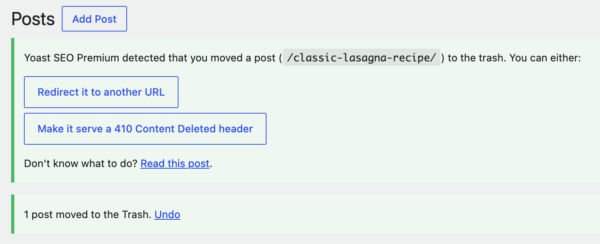
As you can see, the redirect manager in Yoast SEO Premium is an incredibly simple tool to work with redirects. It asks you what you want to do with an old URL whenever you change or delete a post or page. This process takes place in the redirect manager or the post editor. The tool asks you whether you want to redirect the post to another URL or serve a 410 Content-Deleted header, for instance.
Correctly redirecting pages keeps your site usable, fresh, and healthy. Visitors won’t stumble upon dead links, and neither would Google. Google loves sites that are perfectly maintained. The cool thing is that everyone can do this, and you won’t even need to call in your developer to fix it for you.
Types of redirects
The redirect manager supports the most essential redirects. Below are the supported redirects. If you need more information about these redirects, please read the “Which redirect” post. Want to know the difference between a 302 and a 307? We’ve got you covered with this post on HTTP status codes.
- 301 – Moved permanently
- 302 – Found
- 307 – Temporary redirect
- 410 – Content deleted
- 451 – Content unavailable for legal reasons
Inside the redirect manager in Yoast SEO
The redirect manager can do a lot more cool stuff. You can import and export your redirects, and you can bulk delete your existing redirects, too. Unfortunately, it’s not yet possible to change them, for instance, from a 307 to a 301 in bulk. It is possible, though, to filter for redirects to see which ones need changing, or you can find a specific redirect on an article and change it to something else.

REGEX redirects
Not for the faint-hearted, but for the true redirect kings. That doesn’t mean you can’t learn to use it as well, because you should. Making redirects with regular expressions is different because you have to determine what should happen and how it should happen. It is an incredibly powerful tool that can do smart stuff and is your go-to for very specific or large-scale redirects.
WordPress redirect plugin
(The Redirect Manager in) Yoast SEO Premium is an excellent tool, not just an SEO tool but also a site maintenance tool. But don’t just take our word for it. As writer Jody Lee Cates told us:
“I hesitated to pay for Yoast Premium because I am a new blogger without much income yet. But I’m so, so happy I did! The time the redirect manager is saving me is priceless! And it’s giving me the freedom to change URL’s to improve SEO without worrying about creating redirects on my own.”
How’s that for an endorsement?
Read more: Why every website needs Yoast SEO »
