

Catch weak alt text: five new assessments, fix with AI for stores, and more abilities
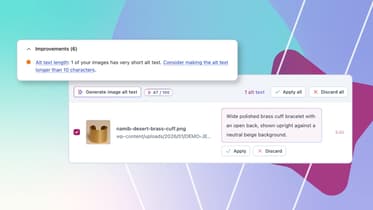
The seasonal rush is almost here. Before your busiest weeks, it’s worth making sure your site works for every visitor, and for every tool you use to run it. That’s the idea behind this release, across Yoast. Five new assessments flag common problems in your image alt text, so your images make sense to people who can’t see them. More abilities let you bring in the AI tools you already use, across more of your SEO. In addition, a security fix keeps private content private, which matters every day of the year.
Running a store? This is where it all comes together. Yoast WooCommerce SEO adds ‘Fix with AI’ to every new alt text assessment, so you can get your product images ready before the rush. Yoast SEO for Shopify loads faster too. Elsewhere, we’ve updated how your XML sitemaps look in a browser, ahead of a browser change. Oh, and MyYoast has a new look.
What’s new for you
- Yoast SEO and Yoast SEO Premium (WordPress): new alt text assessments, more abilities, an XML sitemap update and a security fix.
- Yoast WooCommerce SEO and Yoast SEO AI+: all of the above, plus ‘fix with AI’ for your product images.
- Yoast SEO for Shopify: a faster app and content lists that remember your filters.
- Everyone: a fresh MyYoast login.
Five new image alt text assessments
Alt text is the written description of an image. Screen readers read it aloud to people who can’t see the image, and search engines use it to understand what an image shows. The new assessments flag common problems that stop alt text from doing that job. They’re free in Yoast SEO, and they run on your posts, pages and products:
- Non-descriptive alt text: flags file names, placeholders, numbers and generic labels like “product image”.
- Redundant phrase in alt text: flags alt text that opens with “Image of”, “Picture of” or similar. Screen readers already tell people it’s an image
- Duplicate alt text: flags images on the same page that share the same alt text.
- Keyphrase stuffing in alt text: flags alt text that overuses your keyphrase. With a paid plan, it also catches synonyms, word forms and related keyphrases.
- Alt text length: flags alt text under 10 characters or over 200. Under 10 characters usually says too little, and over 200 makes someone listen to a paragraph.
These assessments only appear when something needs attention. They don’t have a green traffic light, so if you don’t see them, there’s nothing to fix.
They also run on your existing content. If you open an older post and spot new feedback, that’s the analysis doing its job. To find gaps across your whole site, use the new image alt text filters in the Bulk Editor.
The new assessments replace the Keyphrase in image alt attributes assessment. As a result, the focus moves from your keyphrase to what your images show.
Good alt text has always been about people first. What helps a screen reader describe an image also helps search engines and AI systems understand it. Learn how to write alt text that works.
For stores: fix it with AI in Yoast WooCommerce SEO 17.1
Product galleries add up to a lot of images, and a lot of alt text to get right. In Yoast WooCommerce SEO 17.1, the new assessments speak your store’s language: their feedback names your product images. In addition, you can fix what they find without leaving the page:
- Fix with AI on every alt text assessment: draft new alt text right where the problem is.
- Only the flagged images: filter the image alt text window in the product editor to see the images that need work.
- Your whole catalog at once: use the “Needs improvement” filter in the Bulk Editor to find products by issue, then generate alt text in bulk.
You review every suggestion before it saves. Fix with AI is available in Yoast WooCommerce SEO and Yoast SEO AI+. New to AI image alt text? Read how it works.
More SEO settings for your AI tools
With Yoast SEO Abilities, you can use your AI tools to read and update your SEO data. New in Yoast SEO 28.9, you can now:
- Get and set the SEO data of your categories, tags and other terms.
- Get and set the SEO settings of your archives, your special pages (like search results and 404 pages), and a homepage that shows your latest posts.
- Update your author Schema data, the structured data that tells search engines who wrote your content.
Your AI tools always work within your WordPress user permissions, and they run on your own AI model subscription.
We’ve also fixed a bug where the Yoast SEO Abilities for posts couldn’t find a static homepage by its URL.
A change to how your XML sitemaps look
Browsers are removing XSLT, the older technology that turned your XML sitemaps into a neat table when you opened them. Chrome already shows a warning when you open a sitemap that still uses it. To stay ahead of that change, Yoast SEO no longer uses it. If you open a sitemap in your browser, you’ll now see the plain code that search engines read. Search engines still find your pages the same way as before, so there’s nothing you need to do.
Security fix
This release fixes a bug in the get_head REST endpoint, which headless sites and other tools can use to fetch your SEO metadata. The endpoint could leak the (auto generated) social description of private and protected posts and pages to visitors who weren’t allowed to read them. We recommend updating to Yoast SEO 28.9.
Also for Shopify
With the busy season ahead, Yoast SEO for Shopify now loads faster. In addition, your content lists remember your filters, search and sort order when you open an item and come back.
One more thing: a fresh look for MyYoast
Logged in to MyYoast lately? You might have noticed the login screen has had a makeover. Same account, new look.
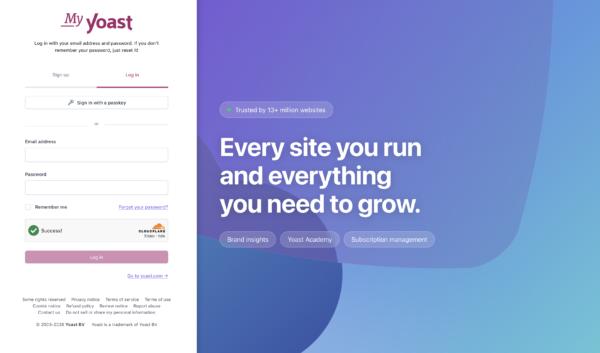
While you’re there, take a look around. MyYoast is where you manage your licenses and sites, follow your Yoast SEO Academy courses, and, with Yoast AI Brand Insights, see how AI systems describe your brand. Sign up to MyYoast.
Update now
Update to Yoast SEO 28.9, and to Yoast WooCommerce SEO 17.1 if you run a store. Then open a post or product and see what the new assessments say about your images.
