

What do breadcrumbs do?
Is your site among those that lose visitors because they don’t provide them with a guiding hand? Breadcrumbs help your visitors and search engines make sense of your website. They give an easy-to-read overview of your site hierarchy. In addition, search engines like Google show the breadcrumbs right in the search results pages. Yoast SEO lets you add breadcrumbs with the flick of a switch. It even automatically adds structured data to your breadcrumbs to help search engines understand them.
Breadcrumbs provide better user experience and improve SEO
- Help visitors and search engines understand your site structure
- Improve CTR to/on your WordPress site
- Automatically add structured data to your breadcrumbs
- Determine how breadcrumbs appear on your site

Did you know?
Breadcrumbs are a wonderful navigation help — and they are good for your site’s SEO. They help people navigate across your site. In addition, they help search engines uncover the structure of your site and where a specific piece of content fits. To support those ties, Yoast SEO adds specific structured data to your breadcrumbs. This makes your breadcrumbs easier to understand for search engines, and it makes it clear how these tie into the rest of your site.
Get Yoast SEO Premium!
Breadcrumbs are available for free in Yoast SEO. But, if you are serious about your site Yoast SEO Premium can help you make your job a lot easier.
Why should I use breadcrumbs?
Breadcrumbs help users figure out where they are
Users don’t often arrive at your site through the homepage. More often than not, they arrive following a link in an article or a search result. This way, they arrive slap bang in the middle of your site, so to say. Breadcrumbs can help give users a sense of where they are on your site.
Breadcrumbs reduce bounce rate
As visitors hardly come to your WordPress site via the homepage, they need a way to move on to other parts of your site. Breadcrumbs can give visitors another way of navigating on your site, improving clicks. For instance, by including your categories in your breadcrumbs, they might click to another part of your site instead of bouncing back to where they came from.
Google uses breadcrumbs to make sense of your site
Google uses breadcrumbs to categorize information on your site. It uses this information to help organize content in the index and to present it correctly when it can match it to a user’s query. This is one of the reasons breadcrumbs also benefit from having BreadcrumbList Schema.org structured data attached to it — it makes it easier for Google to understand your breadcrumbs and its contents.
Breadcrumbs are visible in the SERPs
One of the most important reasons for using breadcrumbs is that they are visible in the search results pages. This makes your snippet a lot easier to digest because it doesn’t feature the full URL anymore, just the breadcrumb path. Everything is visible at a glance.

Yoast SEO lets you decide what category shows up in the breadcrumbs
Let’s say you have a page that belongs to several categories. Without selecting a primary category, your theme would pick one of those categories at random and display it in the breadcrumbs. We don’t want that, and you shouldn’t either. Luckily, with Yoast SEO, you can gain back control and decide which category shows up.
If you have a permalink structure that includes your categories and you use several of them for a page, you may run into a problem. Just like with breadcrumbs, you will see only one random category displayed in the URL. What if you think another one is better suited for the URL? Just use the primary category setting in Yoast SEO, and the problem is solved!
How do I set up breadcrumbs with Yoast SEO?
Once switched on, Yoast SEO automatically adds the breadcrumbs to your site. Some WordPress themes support breadcrumb code out of the box. Otherwise, you need to manually add a line to a file — or use a shortcode to place the breadcrumbs in your favorite location.
Setting up the Yoast SEO breadcrumbs on your WordPress site isn’t too hard. Switch on the breadcrumbs feature, fine-tune the settings to your liking and add the necessary code to your theme. We have an extensive help article that shows you exactly how to set up Yoast SEO breadcrumbs. On that page, you’ll also find information for theme developers on how to integrate Yoast SEO breadcrumbs into themes. Or watch this video below, which guides you through the whole process.
Use the Breadcrumbs block to add breadcrumbs easily to a single post
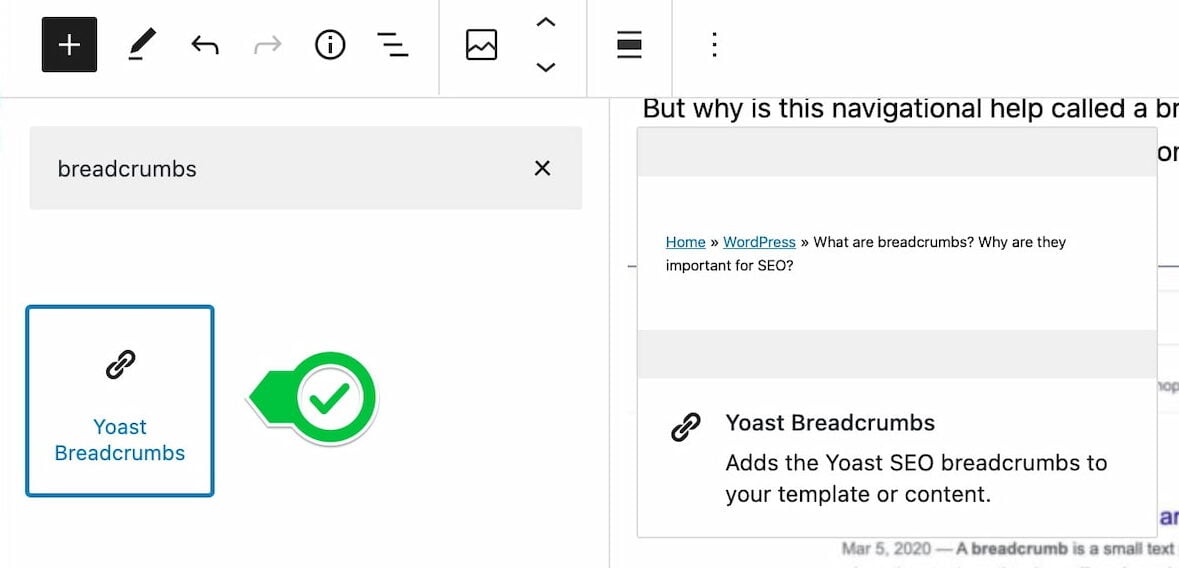
Yoast SEO also comes with an easy-to-add block for the Block editor in WordPress. You can use the Yoast SEO Breadcrumb block to simply add breadcrumbs to individual posts and pages. This is helpful if you don’t want to touch code or if you only want to add to a specific page.
Adding breadcrumbs is incredibly easy — simply hit the big + icon to add a block. You can find the Yoast Breadcrumbs block in the list of blocks by typing Yoast or breadcrumbs. Simply pick a spot to drop in the block and select it from the list!
Get Yoast SEO Premium!
Breadcrumbs are available for free in Yoast SEO. But, if you are serious about your site Yoast SEO Premium can help you make your job a lot easier.
Let Yoast SEO help you win the search rankings
Discover all the features of the Yoast SEO for WordPress plugin.