

How to create a 301 redirect in WordPress

Do you need to create a 301 redirect in your WordPress site? You’ve come to the right place! We’ll show you how to set up 301 redirects using three methods. Do you know if you need to use a redirect or whether a 301 redirect is right? No worries, we’ll explain that, too.
Redirects in a nutshell
The name ‘redirect’ says it all: It sends visitors traveling from a specific page to an alternative one instead. Or, if there’s no alternative, an HTTP header (similar to redirects) can make that clear to users and search engines. It’s like registering a change of address when you move house. What if an old friend visits your old home to visit you? A redirect is like a front door note telling your visitors where you live now. Any time you change a URL or delete a page, you should think about redirects.
Different redirects serve different purposes. Since this post is all about 301 redirects, let’s look at some situations where you might need to use one.
When should you use a 301 redirect?
A 301 redirect should be used when:
- You’ve permanently deleted a page on your site, but you have another similar page you want to send users to instead
- You’ve changed the URL of a page that was already published
- You’re moving your site to a new domain
- You’re changing your URL structure, e.g. changing from HTTP to HTTPS, or removing ‘www’ from the start of your URL
These are some of the more common reasons for using a 301 redirect, but other situations require redirecting, too. And besides that, there are other redirects and HTTP headers you can use in other situations. For instance, if you permanently delete a page and there is no suitable replacement or substitute you can send users to, then a 410 redirect is what you need to use. We have another post where you can read more about which redirects to use in which situations.
Option 1: Create a 301 redirect on the server
To set up a 301 redirect using .htaccess for the given example URLs, you need to add a specific line to your site’s .htaccess file, which is located in the root directory of your WordPress installation. Here’s how you can do it:
- Access your server. Access your site’s files using an FTP client or your web host’s file manager. You can also access and edit your .htaccess file from inside the Yoast SEO tools section.
- Locate the .htaccess file: The
.htaccessfile is usually in the root directory of your WordPress installation. - Edit the .htaccess file: Open the
.htaccessfile with a text editor. - Add the redirect rule: Insert the following line at the end of the file to create the redirect. This rule indicates that requests to
/page-1should be permanently redirected to/page-2.
Redirect 301 /page-1 /page-2- Save changes: If you use an FTP client, save your changes to the .htaccess file and upload them back to your server.
Using this rule, any request to https://example.com/page-1 will be permanently redirected to https://example.com/page-2. The 301 status code indicates to search engines and browsers that the redirect is permanent. Note that this approach assumes the URLs follow the format /page-1 and /page-2 without additional subdirectories. You can adjust the path if your URLs are different.
These configurations can become unmaintainable over time, especially if you’re an avid blogger trying to improve your posts’ SEO. You must also log in to your server over FTP, edit the files, and re-upload them whenever you add a new redirect. That’s why, generally speaking, this method is not considered the way to go.
Option 2: Create a 301 redirect with Cloudflare
Most of us already use Cloudflare in one form or another, so you know that it offers a wide array of tools to help our websites perform. For instance, it comes with a Rules feature where you can set various options related to your website cache. You can also find various redirect options here; this will help you guide up redirects for everything from HTTP to HTTPS to single redirects for individual pages.
It’s easy to set up redirects through Cloudflare. Here’s how that works:
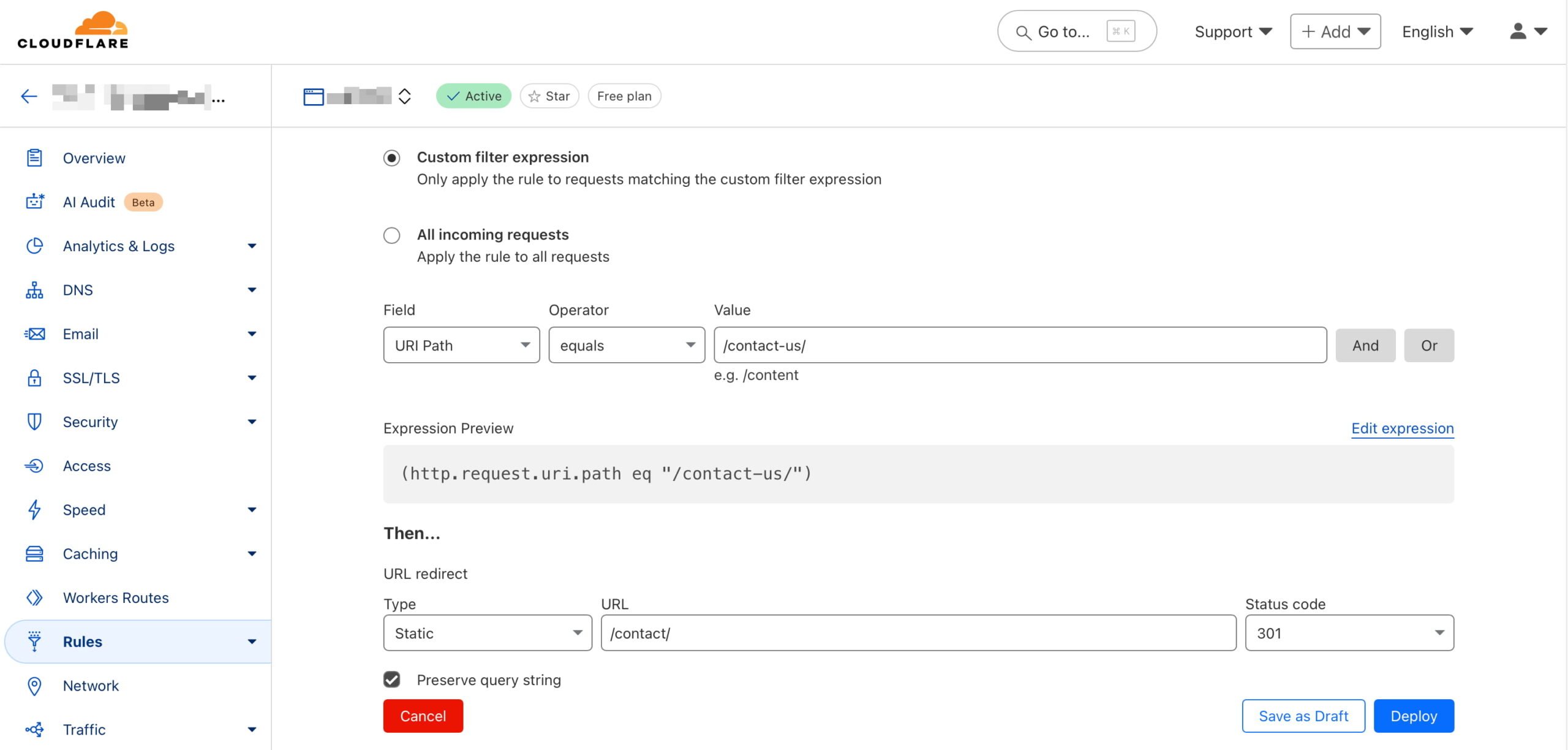
- Log into your Cloudflare account: Go to the Cloudflare dashboard and select your account and domain. Then, select Rules and Overview.
- Create a redirect rule: Select Create rule and then choose Redirect Rule. In the Rule name field, you might name it something like
Redirect Page 1 to Page 2. - Define the matching criteria: Set a wildcard pattern and set the Request URL to
https://example.com/page-1. This means any traffic toexample.com/page-1will be matched for redirection - Set the redirect parameters:
- Target URL: Enter
https://example.com/page-2as the redirect destination. - Status code: Select
301to indicate a permanent redirect. - Preserve query string: Decide based on your preference; enable this option if the original URL’s query string should be retained. When you choose to preserve the query string in a redirect, you keep any additional parameters that may be included in the original URL when redirecting to the new URL. Preserving the query string is often useful for tracking purposes, like retaining analytics or advertising parameters, ensuring that useful data isn’t lost during redirection.
- Target URL: Enter
- Deploy the rule:
Click Deploy to save and activate the redirect.
Now, whenever someone visits https://example.com/page-1, they will be redirected to https://example.com/page-2 with a 301 status code, indicating a permanent move.
You can efficiently manage traffic without touching your server configuration by setting up redirects via Cloudflare. It provides flexibility for using simple patterns or more complex URL structures.
Option 3: Create a 301 redirect the easy way with Yoast SEO
Our Yoast SEO Premium plugin offers you a helping hand when it comes to creating these redirects. Our built-in redirect manager assists you whenever you change the URL of a post, page, or any taxonomies that may result in a possible 404 if you don’t properly redirect visitors. In addition, we also offer you an interface to edit or remove these redirects at a later point in time. The plugin also tells you when you’re about to create a redirect that will result in a redirect loop. This looping is something you want to avoid at all costs.
Here’s how you can set up a 301 redirect using Yoast SEO Premium in WordPress:
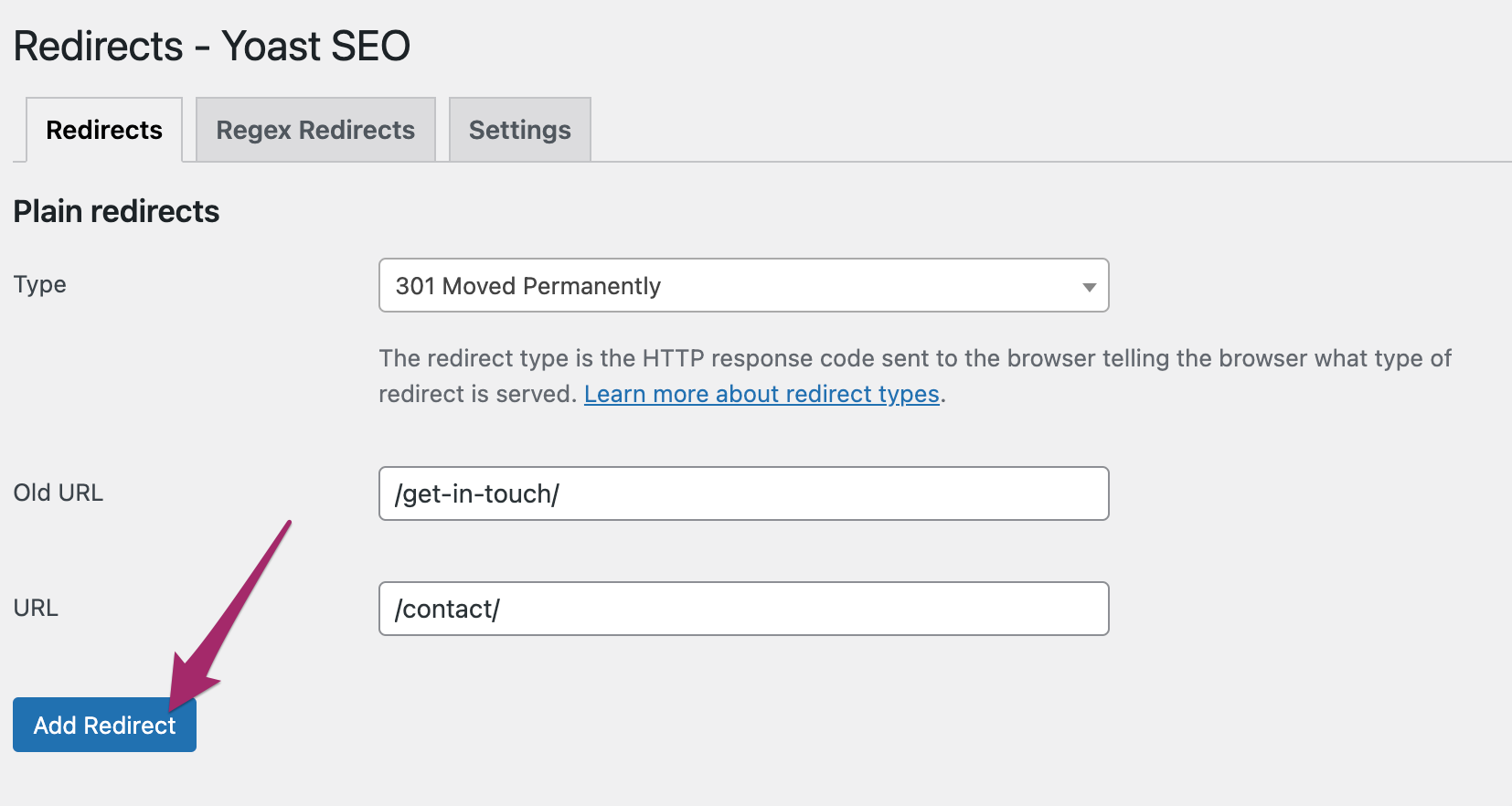
- Access the Yoast SEO settings: Log into your WordPress admin area and navigate to the Yoast SEO section.
- Open the Redirect Manager: Go to the Redirects feature in Yoast SEO Premium.
- Add a new redirect: Follow the steps below to create a new rule.
- In the Old URL field, enter
/page-1as the source path. - In the New URL field, enter the destination
/page-2as the complete new URL. - Choose a 301 (Moved Permanently) from the list of redirect types.
- In the Old URL field, enter
- Save the Redirect: Click Add redirect, and Yoast SEO will handle the redirection.
Yoast SEO Premium also offers an option to automatically redirect deleted content. When you delete a page or post, Yoast SEO prompts you to set up a redirect to avoid broken links. This ensures visitors and search engines won’t encounter 404 errors and are smoothly directed to a relevant page.
These features are part of Yoast SEO Premium, designed to make managing redirects straightforward without manually altering code or server settings. They keep your site user-friendly and help maintain SEO performance by preventing dead links.
Conclusion
Understanding how to set up 301 redirects is essential for maintaining your website’s integrity and user experience. Whether you choose Cloudflare, Yoast SEO Premium, or the .htaccess method, each approach offers a simple solution to guide visitors to the right place, preventing 404 errors and keeping your SEO rankings intact. Smoothly transitioning traffic from old links to new ones enhances usability and search visibility. Choose the best method that suits your needs and keeps your website running smoothly.
Read more: How to properly delete pages from your site »
