

The perfect WordPress SEO permalink structure

In the past, we received a lot of questions regarding optimizing your WordPress SEO URL / permalink structure. Questions ranging from whether you should have the category in your permalink structure to the length of your slugs. In this post, we’ll address some of these questions and attempt to give you a better understanding of your permalink structure.
The ideal WordPress SEO URL structure
At Yoast, we recommend using a simple and clear permalink structure. Ending your URL with the post name is the preferred method and optionally you can prefix the post name with the category, which results in one of the two following permalink structures:
[code]/%postname%/[/code]
And with the category prefixed:
[code]/%category%/%postname%/[/code]
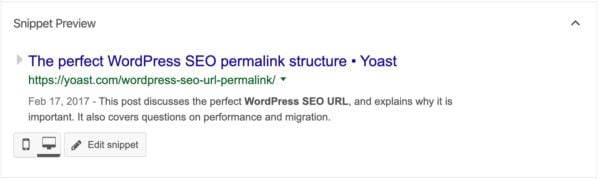
For an added bonus, we recommend adding your main keyword somewhere in the post’s name. When checking out the snippet preview in our plugin, you’ll see your keyword emphasized in the URL if it’s been detected in your slug (see image below).
What about using dates?
Using dates in your URL never had many benefits. When you add dates to your permalink structure, you automatically ‘date’ your posts. People will naturally look for posts with a more recent date, assuming that they contain the best information. However, sometimes older post can hold very valuable information, but won’t get the same amount of clicks due to their age.
Should I use the category in my permalink structure?
If your domain name is nice and short and you use short, yet descriptive category names, you can easily include a category in your permalink structure which can benefit your website, but beware: if you end up with a lengthy slug and category name, it will make sharing the URL more difficult and won’t have much-added value in Google.
If you decide to use categories in your permalink structure, make sure that you only select one category per post. For some more information regarding using categories in your permalink structure, I advise you to watch the following video by Matt Cutts.
Should I add .html to my permalink structure?
In terms of SEO and ranking, there is little benefit to keeping the .html extension present in your URLs. In the video below, Google’s John Muller gives you some advice on changes in your file extensions:
If you need to change your URLs, for example, if you move to a new content management system that doesn’t allow you to use .html URLs at all, keep in mind that this change would be a restructuring of your website. You would need to redirect the old URLs to the new ones.
The discussion whether or not you should forcibly add .html (or any other extension) can be ended very quickly: Don’t do it. It won’t help you and if you add certain extensions such as .exe, it can actually hurt your rankings.
My blog is on Google News. Don’t I need numbers in the URL?
The short answer here is: no. Back in the day, Google News required you to use a three-digit number in your URLs in order to be included in the News index. A way around this was to have a separate XML sitemap. However, since September 2015, both the three digit unique number and XML sitemap are no longer required.
Should my focus keyword always be the first keyword in the URL?
It might help slightly, but if your focus keyword is present in the first few words, you’ll be fine. Matt explains this at great length in the following video.
How many words should I use in my slug?
In this interview with Matt Cutts, Matt mentions the following regarding the length of your slug:
If you can make your title four- or five-words long – and it is pretty natural. If you have got a three, four or five words in your URL, that can be perfectly normal. As it gets a little longer, then it starts to look a little worse. Now, our algorithms typically will just weight those words less and just not give you as much credit.
Should you change your URL structure for better SEO?
You might expect that the answer to this question would be a simple yes. However, if you’ve been blogging for a while, you might not want to make any drastic decisions. Have you been using dates in your permalink structure for the past few years? Then it might be wise to not switch to a structure without them. If you only just started then switching won’t cause you much harm and might even be a huge beneficial step.
However, if you’re still using the “old style” urls (?p=) then it’d be wise to switch regardless of how long you’ve been blogging. This will greatly improve your blog’s potential to be found in Google’s search results.
If you do decide to get rid of dates in your permalink structure, you can add the following redirect to your .htaccess file (if you’re on Apache) to ensure that the old URL (/yyyy/mm/dd/%postname%/) points to the new one:
[code]RedirectMatch 301 /d{4}/d{2}/d{2}/(.*) https://yoast.com/$1[/code]
For Nginx, you can use the following snippet in your site configuration:
[code]location ~ /d{4}/d{2}/d{2}/(.*) {
rewrite ^(.*)$ https://yoast.com/$1 permanent;
}[/code]
If you decide to change existing permalinks always test this first in a staging environment. And do note that exiting social shares will be lost if you change it.
The perfect WordPress SEO URL
Overall, permalink structures won’t differ much from website to website if done correctly. We advise that you make sure your permalink structure is properly set before avidly writing posts. If you do decide to change your permalink structure over time, make sure you properly redirect users from the old structure to the new one.
Read more: How to change your WordPress permalink structure »

Great tips, I wanted to change my permalink structure at http://windows10top.com/ and found this article to be more than awesome. thanks
I have used your seo plugin on many websites and I gotta tell you that you guys are the best. Oh and your right….. adding dates on permalinks doesn’t do a thing for your seo. What’s the point in adding them in the first place.
Thank you for the great blog. Some great SEO friendly tips provided along with Matt Cutts providing some interesting points when optimising your website.
Thank you for the information, I will try to put your advice into practice on our website
An apology for my bad english
regards
Please advise is the seo friendly
/%category%/%postname%.html/
http://youmegeek.com/computer/use-gmail-offline-mac-pc-chromebook.html/
Thanks for the url date snippet for the .htaccess. Would have saved me some time if i thought of this earlier ;-)
It’s odd because the article mentions, “make sure that you only select one category per post.”
However, it this post (https://yoast.com/wordpress-seo/), there is more than one category! Both “Technical SEO” and “WordPress”
::confusing:: Thoughts?
oops… I see the difference. The Category isn’t being used in the permalink structure. //
This was very helpful, I made a lot of mistakes with categories and tags. Yoast SEO plugin helps you make the right decisions, thanks!
I used only Postname for my structure on my Website , i love yoast . Everything are so easy with that .
Hi guys
The information shared on this page has been very helpful in helping me choose what type of URL string to use on our site.
Thank you so much!
Thank you, I was just wondering how to improve my permalinks. Now I got a good guideline!
Very timely we’re in the process of relaunching our website and was wondering if we needed to think about a change in URL structure.
Hi Joost,
Thanks alot for writing this up and sharing your expertise. This will be very handy for my new blog that I have just launched, https://www.yodruggist.co.za
Quick question: For the base url of the blog, should it be /%postname%/ or /blog/%postname%/
Thank you in advance.
Hey Team Yoast,
Thank you for this article. I have always had this issue in deciding the best permalink to adopt on my website. I am now in the process of making some changes.
Thank you,
Chris
Thanks so very much for the great info and I am about to do some changing to my permalinks on my new site. Thanks!!
This really helps, especially the video on Does the position of keywords in the URL affect ranking?
I have to admit I have obsessed in the past as to what position my keywords should take on my URL’s, so thanks for clearing this up.
This is just what I was looking for, my permalinks were a complete mess!
Hello Yoast team,
That was a very helpful post for my new business.
Thank you very much – permalinks are very important.
Hello Yoast Team,
do I have to set manually a “/” at the end of my URL or is wordpress doing this automatically? I normally always to this but now I your tool shows two (//) in the snippet preview at the end of the URL.
Best regards,
Tobias
Hii, Thanks for the sharing nice posting with us. i’m really impressed.
Windows Support
It’s nice to have that one finally cleared up Joost, with video clips from Google itself. Nice article, thank you.