

Yoast SEO for Shopify: Optimize
In Yoast SEO Optimize, you see an overview of the content you can optimize with Yoast SEO for Shopify. You also see how well your content is optimized.
Dashboard
The Dashboard provides you a quick overview of your content and how well it is optimized. The analysis is available for Products, Collections, Pages, Blogs and Blog posts. Want to know what our SEO analysis means? Check out the details of all the assessments in our SEO analysis. Not sure what these Readability scores refer to? We explain all the ins and outs of easy-to-read content on our Readability analysis page.
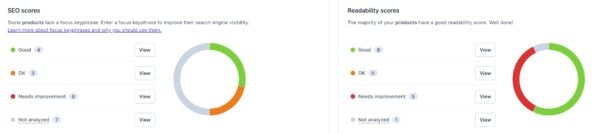
For both the SEO scores and Readability scores, you can filter your overview per content type and per category. If you want to start improving your content right away, you can also click on View to directly go to the content with this rating.
Please note that a grey traffic light here or in your overviews means that your content is not analyzed yet. If you fill in a focus keyphrase in the editor, the appropriate score can be calculated. Similarly, if you’ve entered a focus keyphrase previously or through bulk editing you must return to the editor in order to activate our content analyses. Your previously entered SEO data in Shopify and Yoast Content types are also still recognized, but not yet calculated.
Products
Under Products, you can see an overview of all yourCollections and Products. Clicking on the individual content items takes you the editor where you can further modify your content. You can use the search function to search through all your items, or filter by SEO score and Readability score. For Collections, you can also filter by Availability; for Products you can filter by Status.
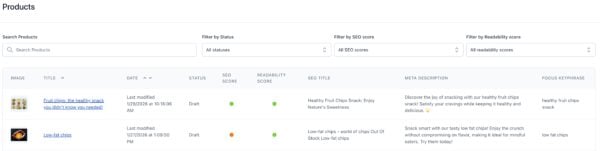
In the overview, you can see the content’s image, title, date, status/availability, SEO score, Readability score, SEO title, meta description and focus keyphrase.
Online store
Under Online store, you can see an overview of all your Pages, Blogs, and Blog posts. Clicking on the individual content items takes you the editor where you can change your content. You can use the search function to search through all your items, or filter by Visibility, SEO score and Readability score.

In the overview, you can see the content’s image, title, date, visiblity, SEO score, Readability score, SEO title, meta description and focus keyphrase.
Bulk edit
The Bulk edit feature helps you efficiently manage and optimize the SEO of multiple pages. You can both export your current data as well as import new data.
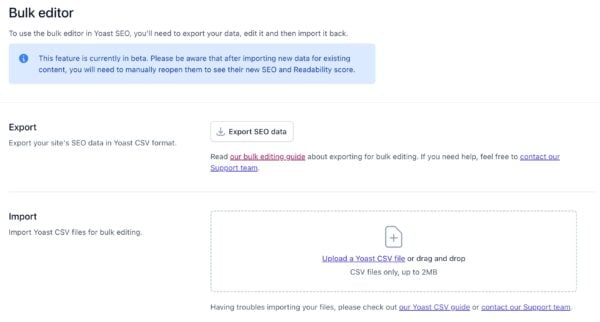
The bulk editor allows you to update titles, meta descriptions, focus keyphrases, and more across multiple pages using a CSV file. This feature is currently in beta.
You can also use our step-by-step guide on how to bulk edit with Yoast SEO for Shopify.

Get more traffic to your Shopify store
Yoast SEO gives you the tools to make SEO easy and grow your store’s organic traffic and sales.
Did this article answer your question?
Still having issues?
Try searching for your issue below