Practical Guide to creating a 404 Error Page for WordPress
I make mistakes. You make mistakes. We all do. And some of these mistakes end up providing our readers with a 404 page. Chances are that page says "Error 404: file not found". How does that help your visitor?
Instead of just identifying the problem, your 404 error page needs to offer a solution.
In the default WordPress Kubrick theme the 404 error page (example) is probably one of the ugliest pages you've ever seen, and chances are yours is not any better. Today is the time to end that. This post will provide you with everything you need to make your "404 - File not found" page a starting point instead of a dead end street.
The goal of a good 404 error page is simple: to make sure visitors landing on it continue browsing your site, and find the content they came for. Let's get going.
Get into your visitors mindset
Get into the mindset of the person that just got to a 404 error page on your site. They were expecting something else, if not, they wouldn't have gone there. So there's a couple of things you should absolutely not do:
First of all, considering they've probably clicked a link somewhere to get to that 404 error page, whose fault is it that they're getting a 404? Theirs? No. Yours? It very well might be, so you'd better apologize.
Second, make sure the styling of your 404 error page fits in with the rest of your site. Sometimes designers go overboard with their 404 pages, and make them look like, for instance, a Windows blue screen. This can have the very undesired effect of people leaving immediately.
Third, if you are going to make jokes, like that Windows blue screen, make sure it's a joke everyone gets. Especially when you're blogging in English, you might end up with a lot of readers for whom English is their second or third language. Your puns, though well intended, might be going nowhere because their mastery of the language isn't sufficient. Because of that they might leave... Is that worth it?
Let's make a killer 404 error page for WordPress
Ok so we know what not to do. We also know that the visitor came to your site looking for specific content, usually having followed a link from somewhere. Now it's time to start giving them ways of doing that. If you're not using WordPress and you're lazy, the Google 404 widget might be helpful. If you are using WordPress, we can do better than that.
Let's let us be inspired by some great 404 error pages:
I'll be honest: the Conversion Rate Experts guys have inspired the first version of my 404 error page. They offer you 4 options to get to the content you were looking for:
- search
- check the URL for misspellings
- check the sitemap
- start over at the homepage
That's a great start. Apple gives you a sitemap straight away. Depending on your site's structure that might be a great idea too.
I wanted to add one more thing: a set of pages that actually might be related to the URL people had typed in. To do that, we'd have to parse the URL and see if there's something useful in there. Let's see what we have to work with:
What data does a 404 error page provide?
A lot of people seem to think that a 404 page is a dead end street. It's not, there's a whole lot of data that can help you find the content your visitor was looking for. Let's start with the URL: it contains something very useful. All the text that's there after the slash of your domain should be pointing you to what it is the person was looking for.
Luckily, WordPress stores that information for you. The $wp_query->query_vars['name'] variable holds whatever was in there. It does do some replacing in there though, it replaces all weird entities with a dash (-). We'll use this bit of information to spice up your 404 error page.
First of all, let's check whether there's a direct match for that var in a page name once you strip out all the things that people sometimes add to your URL erroneously. (If you read on there's an adapted version of the Kubrick 404 page which you can use to update your own themes.)
$s = $wp_query->query_vars['name'];
$s = preg_replace("/(.*)-(html|htm|php|asp|aspx)$/","$1",$s);
$posts = query_posts( array( 'post_type' => 'any', 'name' => $s) );If that doesn't deliver results, you'll want to do a search for that word, to do that we'll have to rip out the dashes in the name, and then do the search. As we're going to re-use the $s variable further on, we'll do that outside of the if statement to check whether the previous query delivered results:
$s = str_replace("-"," ",$s);
if (count($posts) == 0) {
$posts = query_posts(array( array('post_type' => 'any', 'name' => $s) );
}Now we have an array with posts, at least, we hope we do, so let's check that, and loop through it:
if (count($posts) > 0) {
echo "<p>Were you looking for <strong>one of the following</strong> posts
or pages?</p>";
echo "<ul>";
foreach ($posts as $post) {
echo '<li>';
echo '<a href="'.get_permalink($post->ID).'">'.$post->post_title.'</a>';
echo '</li>';
}
echo "</ul>";
}I've made an adapted version of the Kubrick 404 error page, which you can download here.
There's a plugin that does something similar to the above, called Smart 404. It chooses to redirect the visitor to the first result it gets. It wouldn't be my preference, I actually want people to notice that the URL was wrong.
So now we have a great 404 error page, but we haven't used all the data that we were provided with. Another bit of data the 404 provides is the referrer: someone linked to your page with a wrong URL, or is linking to a page that isn't there anymore. So we've got one thing left to do:
Preventing 404 error pages
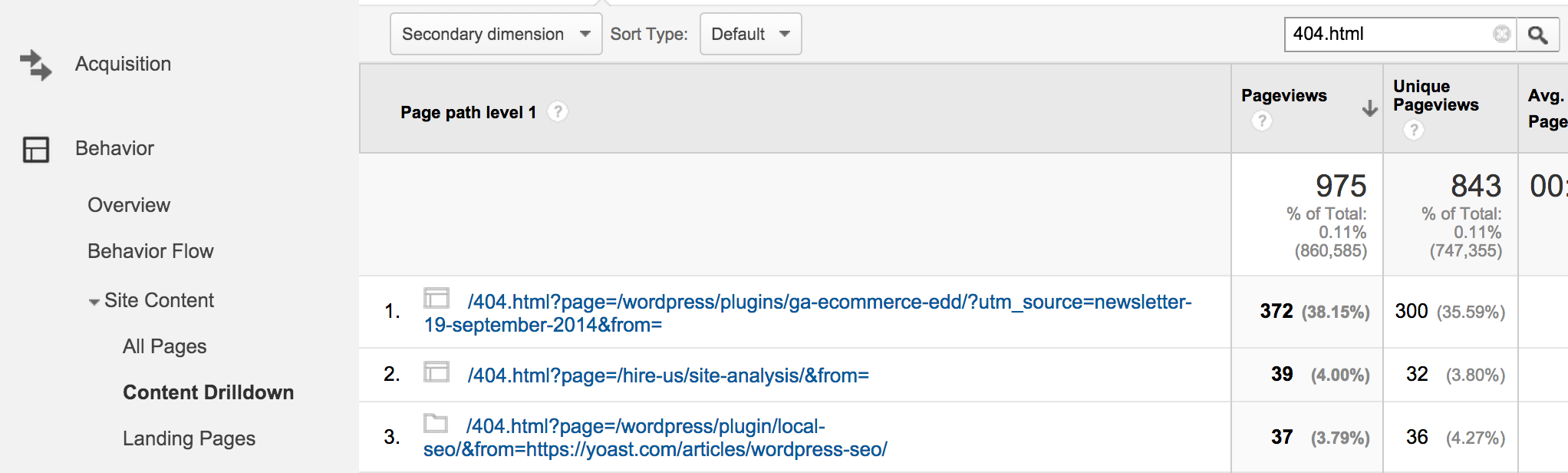
There's a very cool plugin called 404 notifier by Alex King, which can provide you with an RSS feed of the 404's on your site, and Redirection, one of my all time favorite plugins, offers the same functionality. You could also use my own Google Analytics for WordPress plugin. It tracks the 404's as 404.html (look for them in your content report).
Using Google Analytics has the added advantage that it saves the referrer, so you know which URL the visitor originated from. This allows you to not only redirect the URL to the correct place, but also to ask the site that referred the visitor to fix the URL.
Another great way to keep track of 404's on your site is using Google Webmaster Tools. In the Diagnostics - Crawl Errors area of Webmaster Tools Google gives you a great overview of what 404's it encountered on your site:
Two Things you Need to Know about 404 error pages
These are things that WordPress is doing right, but it's good to know these things:
- Internet Explorer will only show your custom 404 page if it's larger than 512 bytes (hard to get smaller than that with WordPress).
- 404 is not only the name, it's also the HTTP header that the page should send, if not, you might end up with 404 pages in the search engines indexes. You can easily check this with a HTTP header checker.
As said, no need to worry if you're using WordPress, but good to know these things.
There's really no excuse left now for a bad 404 error page on your WordPress blog or anywhere else, so go fix yours! Once you've done that, drop your site's URL in the comments, and I'll make a small gallery of cool 404 error pages in this post.


by Chris Kovalenko on 3 November, 2009 at 14:37
Intresting article, I personally like the apple site with all the links, I would mix the apple page with the conversion guys. Have the conversion layout at the top then underneath have it like Apple.
Will take a look at this in more depth later :)
Thanks for the good article
Cheers
Chris
by Joost de Valk on 3 November, 2009 at 15:13
Mix and match all you want, a 404 should fit the site it's on :)
by Richard on 3 November, 2009 at 14:37
it's in Dutch, but there's images on it and everything ;)
http://merchandise.nl/shirts
by Joost de Valk on 3 November, 2009 at 15:12
That's looking like I worked on it :P
by Richard on 3 November, 2009 at 15:13
Could it even be one of the reasons why this post is on your blog? :P
by Joost de Valk on 3 November, 2009 at 15:14
Yeah, very well might be ;)
by Richard on 3 November, 2009 at 15:16
anyways, thanks again for your help!
by Jim Westergren on 3 November, 2009 at 14:50
Another great article Joost! Definitely saved for future use.
by Joost de Valk on 3 November, 2009 at 15:13
Good to hear that Jim, and nice to see you here :)
by Greg on 3 November, 2009 at 14:53
Great Article. the 404 back is easily forgotten but needed. It irks me when i see a 404 that goes to the default apache setting. 404 pages should really help the person find their way. Though the most difficult task can be when you do a complete overhaul of a website and people have bookmarks to old pages. As you really need to pay attention to what they may be looking for and try showing them something on interest.
by A.D.K. on 3 November, 2009 at 14:55
Thanks for this article. It give me some nice ideas.
by Marc on 3 November, 2009 at 14:59
This ia fantastic post and it has most definitely been bookmarked!
I wrote an article on 404-pages a while back (http://bit.ly/3Gnk3D), but this is on another level now. The conversion rate experts definitely have the right idea. Loads of good advice Joost - thanks!
by Fil on the road on 3 November, 2009 at 15:05
Amazing tutorial, like most of your tutorials. I got some new ideas and some new great outlooks on what its possible. Thanks for this interesting point of view, Yoast.
by Ben Huson on 3 November, 2009 at 15:16
I created a WordPress plugin a while ago to simply add the Google 404 widget to your blog. I put it together rather quickly to it may be in need of a little TLC. Your post has promoted me to go back and have a look over it, thanks Joost...
http://bit.ly/2JAT4L
by Joost de Valk on 3 November, 2009 at 16:29
At least the installation page needs work. It says "Add the following code to your 404.php template." and then comes a whole lot of nothing :)
by Ben Huson on 6 November, 2009 at 15:08
Yes, I little bit to do there :)
by jaamit on 3 November, 2009 at 15:28
Great guide Joost, definitely one for the bookmarks.
One question: I've heard that search engine spiders will follow links on a 404 page if it ever falls in a hole, which is one of the reasons for having a sitemap (or cut down sitemap) on it. Any truth in that?
by Joost de Valk on 3 November, 2009 at 16:26
If the 404 page gives a 404 header, search engines will never request the content, so they won't follow those links. If it gives a 200 header, it's treated just like a normal page, but it would mean your error page got indexed...
by archshrk on 3 November, 2009 at 16:06
I've slowly been improving my 404 pages on my sites. Making the message more interesting (and relevant) , adding easy search features and trying to anticipate the visitors' needs/offering solutions. there's always room for improvement and new tips and tricks will emerge as WordPress develops.
by Joost de Valk on 3 November, 2009 at 16:28
Your 404 page does look kinda good. To be honest I'd rip out the ads myself, but that's just personal preference...
by archshrk on 6 November, 2009 at 17:32
Thanks. i looked at your sample 404 page and made some improvements. i never considered removing the ads but that's a thought. maybe put something more useful there - or at least more pleasing.
by Jay on 3 November, 2009 at 16:10
Great post. I have a small tip for theme devolpers out there: Make yor themes 404 page widget-ready. So is it easy to place archives, a searchform, text widgets and so on ;)
Here's my 404 page: http://jayj.dk/404
It's not so useful for the user, but it's just a small personal blog.
by Joost de Valk on 3 November, 2009 at 16:26
Great idea, to widgetize it... Might try that on my own site :)
Pingback: Dienstag, 03.11.09 – Web Tweets | abtwittern
Pingback: Ma revue du Web du jour ! (03/11/2009) | Geek & Cochonneries
by gekido on 3 November, 2009 at 19:15
there is a wordpress plugin called 'smart 404' that does a pretty good job of providing a slick 404 experience in wordpress, without any coding required.
http://michael.tyson.id.au/wordpress/plugins/smart-404/
As well i highly recommend the 'broken link checker' plugin that will do a scan of your site regularly and give you a list of known broken links - which are the most common source of 404 results:
http://w-shadow.com/blog/2007/08/05/broken-link-checker-for-wordpress/
Finally, it is highly recommended that you use some kind of stats system - either directly within wordpress or simply through standard apache logs. these can give you a very useful insight to old / invalid links that people may be using to access your site.
I use a plugin called wordpress stats in combination with google analytics, as well as raw apache log parsing stats systems to collate regular reports on different ways that people find my site:
http://wordpress.org/extend/plugins/stats/
extremely useful, especially for sites that have been around for a while and may have changed layouts / CMS systems etc - you can never tell where / how people are going to find your site.
by Testing Web Sites on 3 November, 2009 at 21:36
I'm so glad to see this post on 404 pages and also reading the comments, as I thought for a while I was the only one thinking that so many 404 pages were terrible, especially relying on the server default Apache or IIS versions.
I have just posted an article focusing on Asda (major UK supermarket chain) and how their 404 pages are generally terrible across their range of sites - http://ow.ly/1mB6Y8.
404 pages can be so important to keep people on your site and provide them with answers rather than slapping them with an error page.
Great post, thanks Joost.
Pingback: links for 2009-11-03 on studiowhiz.com
by Aaron D. Campbell on 4 November, 2009 at 01:34
Great article as usual. Unfortunately, the code is really hard to copy/paste because it is forced to be a single line and is cut off by the overflow:hidden
by Joost de Valk on 4 November, 2009 at 08:38
Hey Aaron,
yeah I need to redesign my <pre>'s :) let me have a look at them.
Cheers
Joost
by Bill Sodeman on 4 November, 2009 at 03:41
Alex King's 404 notifier plugin hasn't been updated in 583 days. It's listed on wordpress.org as untested with WP 2.6 and above. Does it actually work with WP 2.8+?
by Joost de Valk on 4 November, 2009 at 08:38
It should work properly yeah, I'm using a slightly modified version on several sites.
by John (Human3rror) on 4 November, 2009 at 03:55
wow, this is great!
by Ben Lang on 4 November, 2009 at 04:15
I just wanted to give you a shoutout "Yoast". You are a remarkable blogger and a role model to me! Thanks so much!
Sincerely,
Ben Lang
by Srv on 4 November, 2009 at 05:42
I have played with several ideas on 404 pages and got mixed success...but I think we have to keep on
experimenting to see what works best
by Joost de Valk on 4 November, 2009 at 08:39
Well my biggest hope is that you don't get a chance to test your 404's too much ;)
by Tim Leighton-Boyce on 4 November, 2009 at 09:52
Couldn't agree more about 404 pages. If you're using Google Analytics, try setting up a goal for the 404 page.
That way you can see the "conversion" rate for the goal. These days you can also set up a custom alert to email you if that conversion rate increases at a rate above a specified threshold. You could also use the GA "Reverse Goal" path to keep an eye on the different routes by which people arrive at the 404 -- which should highlight any new broken internal links.
by Luci on 4 November, 2009 at 11:11
A great post! I really dislike ill-designed 404's in the event that I land on one, and try to bear as much in mind when designing my own - so I'm particularly grateful for the pointers you've provided from the conversion rate experts. Thanks!
Pingback: Tutorial: 404-Seite verbessern | Wordpress Lesezeichen
by jd on 4 November, 2009 at 11:44
the best way to get something out of 404 pages is to make customized them and make them
action taking page and put something for users to click on instead of sucking simple page not found errors, see here some great work for customizing 404 pages
http://www.w3planting.com/2009/10/30-creative-404-pages-for-your-inspiration-w3planting/
Pingback: How to Create Useful 404 Error Pages: Small Business Websites
by Rob on 4 November, 2009 at 18:25
Good article. This is often a page that is forgotton and a sure fire to drive visitors away if not done correctly.
My personal favourite page is the apple.com 404, keeping it typically simple and mimicking the sitemap.
by Tim Leighton-Boyce on 4 November, 2009 at 19:58
Talk about topical:
Anne Holland's "Which Test Won" has just published one of their a/b polls on two different 404 pages.
Both are more helpful than the basic "sorry not found" version, so it's particularly interesting to compare the results. It's an ecommerce site and there turns out to be considerable revenue left on the table by one of them...
http://bit.ly/3AVZxr
Tim
Pingback: delicious Links: 04. November 2009
by Frank Lynch on 5 November, 2009 at 12:03
Informative article. Added into my favourites.
by Rajesh on 6 November, 2009 at 11:33
Thanks for this. I am using your suggestion, guess I would need to refine it later on. I remember there was a plugin which was terrific and gave suggestions while encountering no results found during "search" based on relevance; maybe it can be refined for 404 too! Unfortunately can't remember it's name though :(
by Rajesh on 6 November, 2009 at 11:34
Heck! I think this was one of yours :)
by Robert Phillips on 6 November, 2009 at 13:26
Great Idea to retain the visitor if 404 error page occurs. I will follow this idea to my blogs and websites by setting up a killer 404 page. By doing so, we attract the visitor by giving some information and related links to other pages of the website or a blog. I also use the measures to prevent the 404 error pages .Anyway thanks for sharing this valuable information.
by themisfit on 6 November, 2009 at 15:04
This just came in handy. Great information on this site.
by tube on 6 November, 2009 at 16:43
very useful information ..thanks a lot , I will try to build a useful 404 page for my blogs using these guidelines :)
Pingback: Daily Digest for November 8th | More Than Scratch The Surface
Pingback: links for 2009-11-08 « toonz
by Elena Demenova on 9 November, 2009 at 01:23
a very helpful plugin - thanks !
by Oes Tsetnoc on 9 November, 2009 at 02:24
nice info.. thanks yoast
by Tony on 9 November, 2009 at 10:46
I don't usually get any 404 errors on my wordpress sites since most of my content is blog posts rather than fixed pages, however this information will come in very handy for improving the 404 pages on my other (non-wordpress) sites. Great advice as always.
by Roseli A. Bakar on 9 November, 2009 at 11:08
Thanks for the tips Yoast ! Just awesome..
by Rachel Nabors on 9 November, 2009 at 16:48
Nice writeup! While this 404 page I made isn't a spectacle of re-routing ingenuity, I remembered to add a search form:
lovemysmartcar.com 404
It would be great if we could parse the words in the failed url and deliver a list of possible matches, like a related posts plugin, directly on the 404 page.
by archshrk on 9 November, 2009 at 17:12
Rachel, the sample 404 page Yoast provided (just below the code) includes a "suggested post" section. It shouldn't be too hard to grab that portion and add it to your 404 page.
Here's the link - http://cdn.yoast.com/uploads/2009/11/404.zip
by Tschai on 9 November, 2009 at 20:57
My site being still in Alpha stage, I guess a good error/404 page is...a good idea.
And for a gallery a 404 page is nice and effective:
http://fan-tas-tic.com/2009/11/fusion2
;)
Pingback: Geeky Yet Cool – Link Roundup: 11/9/09
by Tom on 10 November, 2009 at 10:04
Great article... i'm looking already longer for good 404 solutions. now i found the perfect article!
thanks!
by William Parker on 10 November, 2009 at 10:29
Nice article. I do have a blog but at the moment it is secondary to my main work. But I rather think I shall have to do some more work on it now!
ref. Google's 404 Widget, it doesn't work for me... rather than inserting some useful output in my custom 404, it completely replaces it, which is what I DO NOT want. Actually, I think the most I need for mine (umm, http://redlionhotel.eu/duff.html) is a search box to finish it off.
Cheers
William
Pingback: Max Design - standards based web design, development and training » Some links for light reading (10/11/09)
by Jocas on 10 November, 2009 at 13:37
Nice article... I have a big problem in my blog... The Google WebMasters tool give me 134 not error.
I have already tried everything and I just can fix it... I think theres something wrong with my template code, but i'm not an expert...
Even your Robots Meta Plugin give an error [function.fread] or something like that...
Can you help me...
Answer me please...
by Richard - Accessibleweb on 10 November, 2009 at 14:58
The trouble with using Google Analytics to track 404s is that you might find it is your most popular page!
Seriously though, the one thing I would add into a 404 page on top of what you have suggested is an easy means of contacting the webmaster e.g. a phone number and a link to the contact page (or even a direct contact form within the page).
Pingback: Os 62 Melhores Blogs com Dicas para Blogueiros! | Análise Blogueira
by Roy Ho on 12 November, 2009 at 18:30
In my opinion a 404 page should not be overly complicated. 404 should be just that, a 404 page. When a visitor is looking for something specific and land on your 404, they want to see only two things, 1 is that the information is not listed or not found and 2 what are the alternative options. But if you overwhelm them with a whole list of information that has nothing to do with what he/she is looking for, it just confuses them and gives them the run around. Yes, I know we are trying to be helpful by presenting "related" topics but it can be daunting if the information is too much.
On my site, I just inform the visitor that the page was not found so you can either try another search or choose from the navigation menu on top.
Again this is just my opinion....
by archshrk on 12 November, 2009 at 19:08
Good point Roy, and that's something we all need to consider. Is my 404 page too much or too little for my visitors. I'm still not satisfied with mine but a little tweak here, a little change there... eventually, it will be something I can say serves my visitors well.
by Roy on 12 November, 2009 at 21:07
I like the "404 is not a dead-end street, but a start page" mindset. With that we can make our 404 pages, just like a regular page with all the needed information laid out for the visitor.
by S.Smith on 14 November, 2009 at 07:57
Ah it's a simple list...I will employ it shortly on my 404 which is way to long...and on another blog which is way too short.
by Boni on 14 November, 2009 at 12:07
Thank you man, this is a great tutorial, and thanks for the file, i have done some modification to the file... thanks very much..
Pingback: » Wordpress Popular Posts anzeigen ohne Plugin
by maryjanez on 19 November, 2009 at 03:21
thanks for sharing yoast..
it's usefull
by John Samuel on 19 November, 2009 at 07:52
The theme I am using has only the search button in the 404 page. I think, such cases occur when you change the permalinks and the best options is to use plugins like Platinum SEO which takes care of such problems
Pingback: » Practical Guide to 404 Error Pages: What WordPress is Missing
by Manpreet Kaur on 24 November, 2009 at 08:52
Thanks Jost. Nice post to create 404 error page for wordpress. I was really searching for a solution for this problem. I got a nice series of 8 postings on Error 404 Pages at http://seo-insights.blogspot.com/search/label/Error%20404%20Page but it explains only about creating 404 page in a site. I will implement this in my blog also.
Pingback: November ‘09: Best Search/Marketing Posts
Pingback: November ‘09: Best Search/Marketing Posts | seo cloak