

accurate, accessible, and never an afterthought
Image alt text for SEO and accessibility
Part of Yoast’s SEO analysis. From one post to thousands of product images, Yoast assesses your alt text as you work, so you catch gaps before you publish.
Included in Yoast SEO, Yoast SEO Premium, Yoast WooCommerce SEO, Yoast SEO for Shopify and Yoast SEO AI+

Built for your site
See what’s missing across your whole site in one place.

Free in Yoast SEO
The assessments come with the free plugin

Every visitor
Including people using screen readers
What Yoast assesses
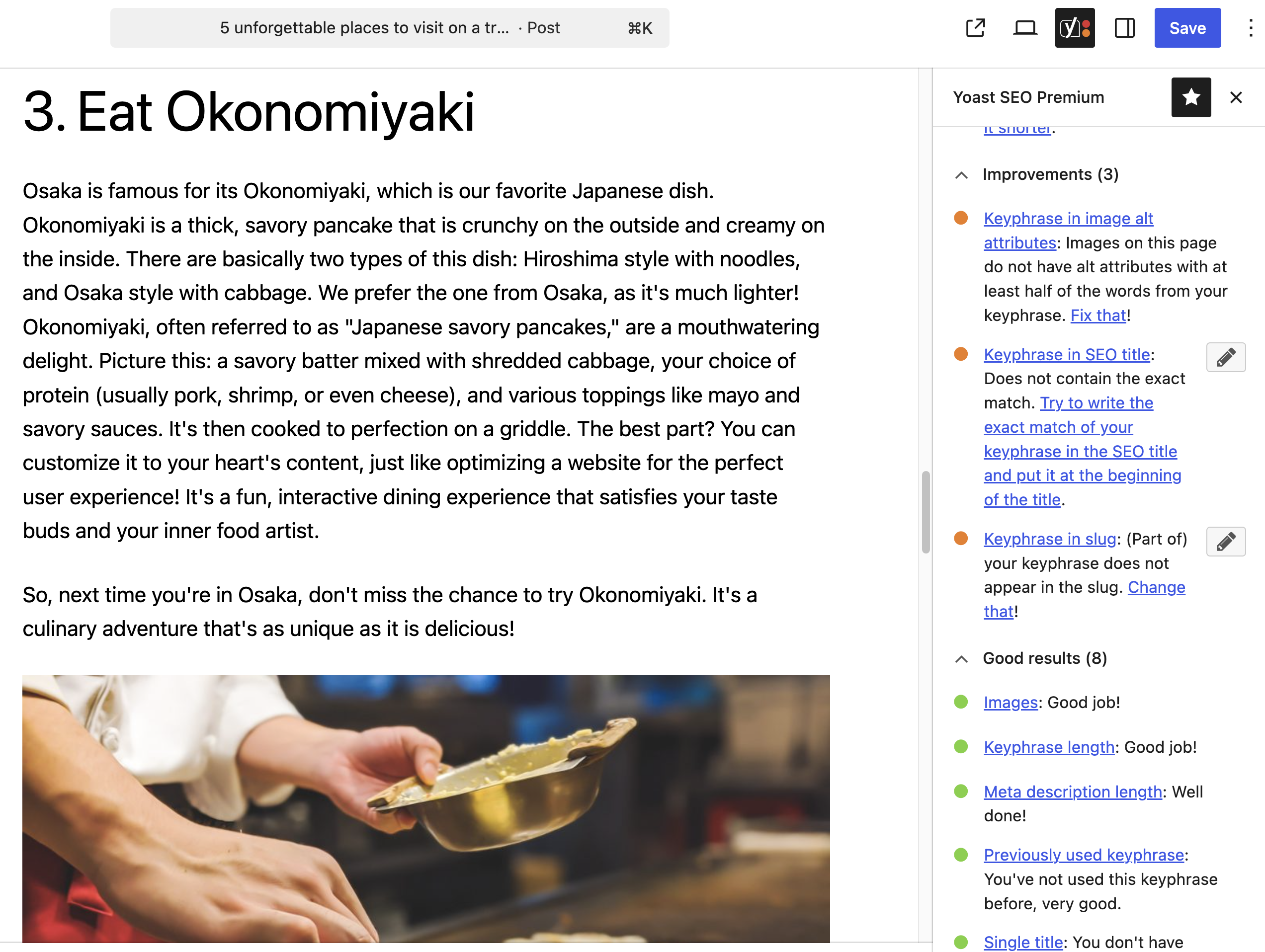
Every informative image needs alt text: a short description that stands in for the image when someone can’t see it. Yoast assesses your images as you write and tells you what to fix.
Alt text quality
Five assessments look at the description itself: whether it’s the right length, whether each image gets its own description, whether it opens with a redundant phrase, whether it says anything at all, and whether your keyphrase has been repeated past the point of being useful.
Images on the page
Yoast also assesses whether your content includes images, and on product pages whether you have enough of them and whether any are missing alt text.
How to fix your image alt text

Fix: alt text length
Aim for a phrase or a short sentence. Under 10 characters usually says too little, over 200 makes someone listen to a paragraph before the page moves on.

Fix: duplicate alt text
Give each image its own description. For three photos of the same boots, say what’s different in each: front view, side view, close-up of the sole. If an image is only decorative, leave its alt text empty

Fix: redundant phrases
Cut “Image of” and start with the subject. Keep “screenshot” or “illustration” when the type of image is worth pointing out.

Fix: non-descriptive alt text
Replace file names and placeholders with what the image shows. If the image is purely decorative, an empty alt text is the right answer.

Fix: keyphrase stuffing
Write the description first, then check whether your keyphrase is already in it. Once is plenty. Twice is a warning, more than twice is a red traffic light.
Fix: across your catalog
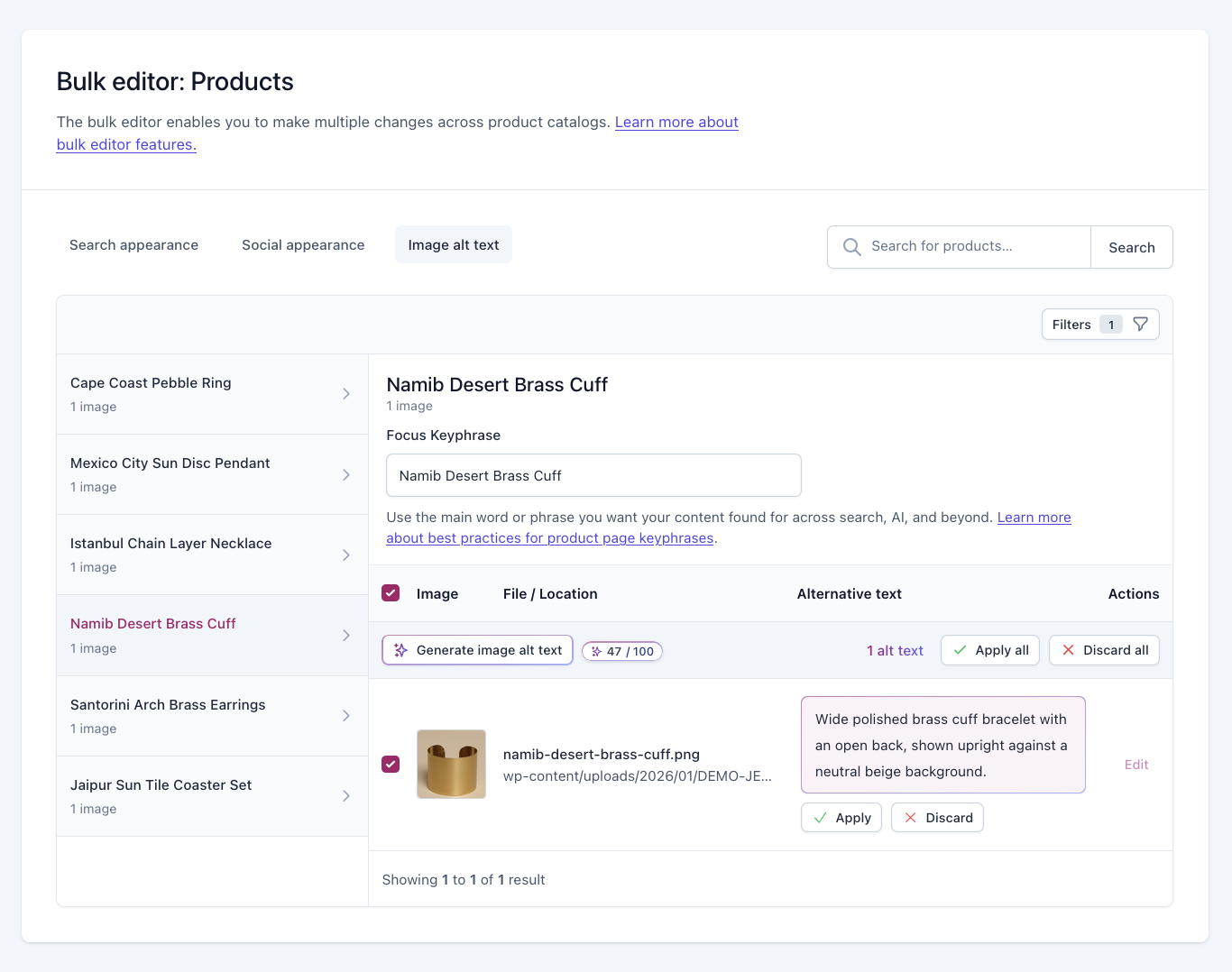
Use the Image alt text tab in the Bulk Editor to find every product image missing alt text, without opening a single product.
What makes alt text good

Decorative
Images that are purely visual don’t need a description. An empty alt can be correct.

Functional
Images that are a link or a button need alt text describing what happens.

Informative
Images there to inform need a real, concise description of their content.
Why this matters in today’s market
Alt text has always done two jobs. Two things now make getting it right a bigger advantage than it used to be.
Search itself is leaning more on image context
Image search and AI-driven discovery are both growing.
Accessibility regulation is tightening
Alt text is increasingly part of what regulators expect.
Alt text at scale for online stores
Ecommerce catalogs make alt text harder to get right at scale. Hundreds or thousands of product images, often uploaded in a hurry, often with generic or missing descriptions.
- Too thin:
alt="product1234.jpg"oralt="shoe"tells a screen reader user almost nothing, and gives search engines nothing to index the image against - About right:
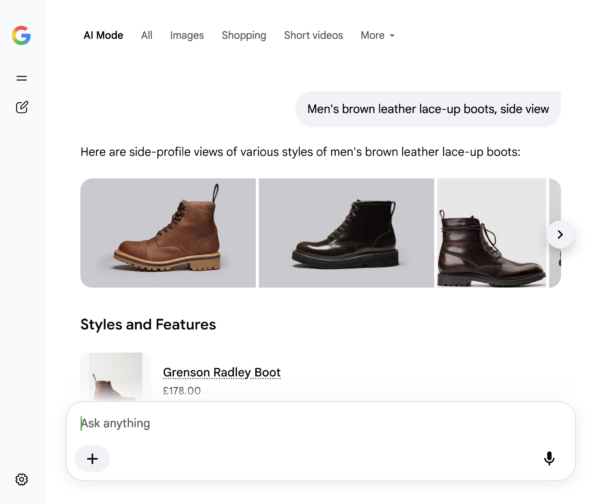
alt="Men's brown leather lace-up boots, side view"describes what the product is, helps a shopper using a screen reader know what they’re looking at, and helps your product images surface for the right search - Add the product ID when you have one: include the full product name and the product ID (SKU). It’s easier to match the image to the exact item.
- Decorative product-page elements, like a background texture or a section divider, don’t need descriptive alt text at all:
alt=""is correct there, so you’re not adding noise for screen reader users trying to get to the product details

How to stay on top of alt text across your catalog

Step 1: Spot gaps as you go
Yoast assesses each product page as you edit it.

Step 2: See what’s missing in one place
The Image alt text tab in the bulk editor shows how many product images are missing alt text.

Step 3: Clear the backlog faster
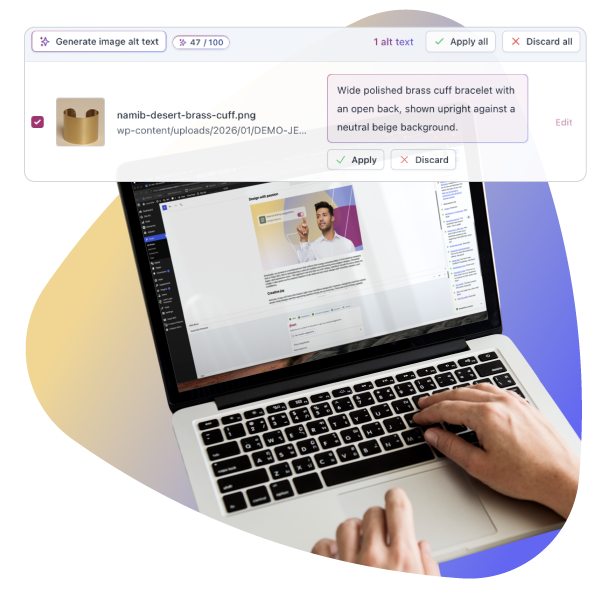
Draft descriptions with Yoast AI Generate, and review each one before it saves.
From flagged to fixed
Yoast AI Generate for image alt text
Yoast already shows you which product images are missing alt text. Now you can fix them: generate alt text from your product data and the photo itself, then review and apply what you’re happy with.
Grounded in the photo itself
Descriptions match what’s in the image, without generic filler or made-up details.
Nothing goes live until you say so
Preview every suggestion, then apply, edit or discard it.
Your existing alt text stays put
It only changes if you choose to replace it, after comparing both side by side.
Part of Yoast AI Generate. Explore Yoast AI Generate
What’s in each plan
| Yoast SEO | Yoast SEO Premium | Yoast WooCommerce SEO | Yoast SEO AI+ | Yoast SEO for Shopify | |
| Alt text quality assessments | |||||
| Alt text length: flags alt text that’s too short or too long | ✓ | ✓ | ✓ | ✓ | – |
| Duplicate alt text: flags images on the same page that share the same alt text | ✓ | ✓ | ✓ | ✓ | – |
| Redundant phrase in alt text: flags alt text that opens with “Image of” or similar | ✓ | ✓ | ✓ | ✓ | – |
| Non-descriptive alt text: flags alt text that’s a file name, a placeholder or a generic default | ✓ | ✓ | ✓ | ✓ | – |
| Keyphrase stuffing in alt text: flags alt text that overuses your keyphrase | ✓ | ✓ | ✓ | ✓ | – |
| Word forms and related keyphrases in the keyphrase stuffing assessment: matches different forms of your keyphrase in supported languages, and assesses your related keyphrase too | – | ✓ | ✓ | ✓ | – |
| Image assessments | |||||
| Images: assesses whether your content includes images | ✓ | ✓ | ✓ | ✓ | ✓ |
| Images on product pages: recommends at least four product images | – | – | ✓ | ✓ | ✓ |
| Image alt attributes: flags product images that have no alt text | – | – | ✓ | ✓ | ✓ |
| Sharper product image assessments: Images and Image alt attributes count only the product’s own featured, gallery and variation images | – | – | ✓ | ✓ | – |
| Fixing alt text across your catalog | |||||
| Image alt text tab in the Bulk Editor: see which images are missing alt text without opening each item | ✓ | ✓ | ✓ | ✓ | – |
| Yoast AI Generate for image alt text: draft alt text from your product data and the photo itself, then review before it saves | – | – | ✓ | ✓ | – |
Yoast WooCommerce SEO
Fix what Yoast flags, across your catalog
Hundreds of images without alt text? Clear the backlog without writing every description yourself, right where you manage your products.
What you get with Yoast WooCommerce SEO:
- Yoast AI Generate for image alt text, at no extra cost
- AI titles and meta descriptions for products and categories
- Bulk edit product metadata in the Bulk Editor
- Everything in Yoast SEO Premium, included
Also included in Yoast SEO AI+.
FAQs
Yes, the image assessments are free in Yoast SEO. For product images, Yoast WooCommerce SEO and Yoast SEO for Shopify add the Image alt attributes assessment, and Yoast WooCommerce SEO adds Yoast AI image alt text.
Not directly. It helps search engines and AI platforms understand your images and surface them in image search.
Probably, if you sell to customers in the EU or UK. Rules vary by business size and sector, so confirm with a qualified adviser. Alt text alone doesn’t make a site compliant.
You generate alt text from your product data and the image itself, and in our testing the suggestions rarely got details wrong. You review every one before it saves, so you have the final say.
No. You’ll see your current alt text and the suggestion side by side, and nothing changes unless you choose to replace it.
You can generate alt text for PNG, JPEG, WEBP and non-animated GIF images. For other formats, such as AVIF or SVG, you can still write it yourself.
Yes, the AI features support all languages. However, the performance may vary for less widely used languages.
*The regulatory summary above is a general overview, not legal advice. If you need to confirm exactly how these rules apply to your business, talk to someone qualified in your jurisdiction.