Yoast: Building Page.ly Part4: Scalable and Fast Managed WordPress Hosting | Page.ly Blog http://t.co/ba32Hemn
![]()
What are “custom taxonomies”?
WordPress, with version 2.3, introduced the concept of Tags. As described by Wikipedia, a tag is "a non-hierarchical keyword or term assigned to a piece of information". This meant WordPress had a hierarchical way of classifying information (categories), and a non hierarchical way of classifying information. As far back as in 2006, people were discussing the fact that tags are not categories.
The issue is that WordPress calls them both "taxonomies", when they're actually not. They're not, because the word taxonomy, as described in another Wikipedia page, assumes a hierarchy of sorts. Now, with version 2.8, WordPress introduces (or actually gives more easy access to the already available backend for) custom taxonomies.
These custom taxonomies can be either non-hierarchical (eg. "tag" like) or hierarchical (eg. "category" like), but for now only the non-hierarchical taxonomies benefit from the smooth integration. These taxonomies are more "real" taxonomies though, as they add a level of hierarchy to the tag structure.
Let me give you an example: you could have a People and a Places taxonomy. Now, when you write a new post, you decide to add a keyword in the People taxonomy. By doing that, you're saying that it's a keyword (or tag, if you want) of the type People, so it is hierarchical in a way. But it also makes the keyword that much more informative, as it adds another layer of information.
For those more visually inclined, my buddy Roy Huiskes helped me by making a graphical explanation of the subject:
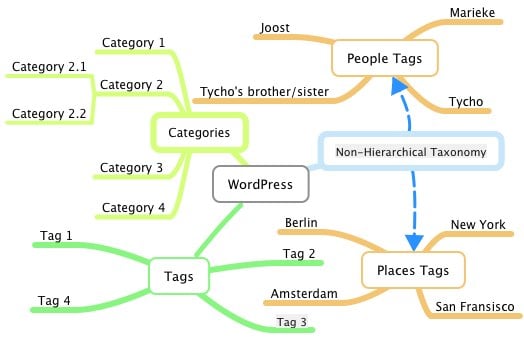
Now as said, WordPress 2.8 gives more easy access to these new "non-hierarchical" taxonomies, but I wanted to make it even easier. Hence, my newest plugin: Simple Taxonomies. It takes care of creating the taxonomies, making sure their URL rewrites work (eg. http://example.com/people/joost/), creating widgets for it, allowing you to add it to the end of posts and excerpts, and even comes with a set of template tags for tag titles and descriptions.
Tags: WordPress Plugins, WordPress Widgets
Category: SEO
You can skip to the end and leave a response.
Other posts you might like:
32 Responses to “What are “custom taxonomies”?”
Comments closed, if you feel you have something to say:
drop me a line.
Google Analytics WordPress
Track your WordPress site easily in Google Analytics and add lots of data, for example views per author & category and automatic tracking of outbound clicks, pageviews & downloads.
Our Sponsors
Why Yoast is so speedy
Finding the WordPress hosting solution that's right for your site isn't easy. Trust me, I learned the hard way. You've probably noticed it though: yoast.com loads pretty darn fast.
That's because it's hosted on a VPS.net Cloud Server, and our static content is being served by MaxCDN: a huge network of content servers around the world.
Combined, it's the perfect hosting solution for this ste. Let my experience help you find the best WordPress hosting solution for your site!
Donate
If you like what I do, please consider donating a token of your appreciation.
Join Yoast on Facebook
Our Sponsors
Tags on Yoast
WordCamp WordPress Hosting Interview WordPress Themes SEOktoberfest Social Media Link Building robots.txt Greasemonkey SMX Online Marketing WordPress Plugins Personal Feedburner PHP Affiliate Marketing SES A4UExpo Twitter PPC Reputation Management Facebook Conferences Blogging Spam XML Sitemap Web Design Rich Snippets Keyword Research Microformats Paid Links Rankings Technorati SEM Google Sponsored Reviews Hosting Email SEO tools RSS Apache WordPress SEO Google Analytics Usability Analytics


by Carl Hancock on 9 June, 2009 at 00:00
How about a version that supports custom hierarchical taxonomies?
by Joost de Valk on 9 June, 2009 at 00:01
I've absolutely thought about it, and am still thinking about it. Wanted to get this out, but might add that in the future.
by Navin Poeran on 9 June, 2009 at 01:29
Very nice article, just the other I was reading a terrific post about this at SEObook.
For those interested, should check it out for sure:
http://www.seobook.com/search-taxonomy-getting-inside-mind-searcher
by Damon Gudaitis on 9 June, 2009 at 03:45
Wow and thank you. This was on my to-do list, so you just saved me some time and probably did a better job too.
Also, your site isn't displaying properly in Firefox on my Mac. The "Speaking" list item is on a new line displaying on the left of the page under the "Wordpress" section and all of the attached formatting is throwing everything off. Contact me if you need help reproducing the error
by Joost de Valk on 9 June, 2009 at 07:21
As said in email, get a proper nofollow highlighter that uses outline instead of border :)
by Seotaal on 9 June, 2009 at 11:34
Normally an taxonomy is a classification based on observations. A classification is based on a concept.
In this context i don't find the denomination taxonomy correct, but I understand what wordpress means. In spite of tags not being hierarchical, a cetain hierarchy is still possible. So a great addon to the WordPress tags system :).
by Joost de Valk on 9 June, 2009 at 15:28
Hehe well the choice of terms for things like these is horrible to do well, I guess...
by Piet on 9 June, 2009 at 11:53
Forgive me my ignorance, but now I know what custom taxonomies are, but I (still) don't understand what their function is and how to use them...
Is that easy to explain or do you know (of) a good source for that answer?
btw congrats on the cooperation between you and Brian!
by Joost de Valk on 9 June, 2009 at 15:29
Best way is to try them... Check out my plugin and give them a go!
by David Bell on 9 June, 2009 at 16:47
Hey Joost, another interesting plug-in, I'm definitely going to be using this one. Just what I need for one of my client sites. Thanks very much.
by Steffen on 10 June, 2009 at 08:57
Great! Future starts now!
Long time hoped of this http://nerdlife.net/custom-taxonomies/, how you are here. thanx
by Rob Blatt on 11 June, 2009 at 05:35
Love the plugin, but I'm looking for a way to create a page with all of the terms of a taxonomy. For instance, on my site I have a taxonomy for "bands played" and I'm looking to create a page that displays all of the tags created. Am I missing this?
Pingback: Here in HP, a Highland Park, New Jersey blog » Upgrade to WordPress 2.8
by Shane on 12 June, 2009 at 03:35
Any plans to be able to move taxonomies from one group to another? This would be especially useful for sites that have hundreds of post-tags, but would like to break it up in places, people, etc.
Pingback: Theme Playground | Community Roundup: GPL, new sites launched
by Engelium on 13 June, 2009 at 11:14
Hi
I'm very interested in custom taxonomies but in my tests this plugin didn't work as expected
In options it's all right but:
- If I click on the link for a taxonomy (at the end of the post) I get a "Page not found" message
- seems there is not a feed for custom taxonomies
Tank
by Charles Clarkson on 21 September, 2009 at 18:05
Try updating your Permalinks (Settings -> Permalink). Just go to the page and click Save Changes after installing the Simple Taxonomies. THat helped me solve a similar problem.
Pingback: WordPress 2.8 is uit (+Resources) : WordPress Dimensie
Pingback: EG-Link: revue de blogs | Emmanuel GEORJON
by meatbagwtf on 15 June, 2009 at 20:43
Very cool post. To me, it's amazing that tags and categories have been confused and abused for so long. The wordpress.com help pages, back in 06 if I recall correctly, did little to relieve this confusion. The solution I undertook at the time was to use tags and categories more-or-less interchangeably, but to limit the use to one or the other as much as possible (to reduce duplicate content) and to rename "tags" or "categories" according to the desired taxonomical top level designator :) (like "posts", or "mesothelioma", or something). Kind of goofy, but imagine it's 2006 and you have stakeholders asking "ok, we have categories, what about tags? Don't we need those too?"
Hmmm, the old Wikipedia page on folksonomy seems to have a bit to say about hierarchies and tags: http://en.wikipedia.org/wiki/Talk:Folksonomy/old
by Adam on 16 June, 2009 at 18:53
Awesome plugin! One bug: quick edit of items doesnt seem to work- I get an 'edit failed' error every time. Thanks for the awesome plugin!
-Adam
by Joost de Valk on 16 June, 2009 at 21:45
That's a bug in "core" then :)
by Oren on 16 June, 2009 at 20:31
Why are you linking wikipedia links to non-informative terms such as "As described by Wikipedia" and "as described in another Wikipedia page". Is there any particular reason for this (SEO stuff) or not?
by Joost de Valk on 16 June, 2009 at 21:45
No :)
by Oren on 17 June, 2009 at 10:00
Oh cool :) I thought that you guru SEO guys spend hours making every post perfect, well this myth is dead now.
Pingback: Community Roundup: GPL, new sites launched | GreyBlogs.com - Themes
by seo company on 19 June, 2009 at 01:12
Like everything in life, wordpress taxonomy can organize the data in a vertical pattern and in an horizontal way too, where there is no ascending or descending order.
by Michel H on 1 July, 2009 at 14:58
I'm very visually inclined, but it still took me a while before I grasped the concept of custom taxonomies. At least, I think I understand. I HOPE I understand.
Say I'm going to blog about certain products (which is true, and led me to the subject of custom taxonomies). Let's take cars for example. Then an example of a custom, hierarchic taxonomy would be to create a 'body type' taxonomy, with tags like 'convertible', 'sedan', 'hatchback' and 'coupe'. Is that right? But then, your bit about making sure the URL rewrites work, confuses me again. Would that mean that blogURL/bodytype/hatchback would lead to a list of articles about hatchbacks?
If that's what it is, I think I'm half way where I want to be. What I would like is to put the products (cars for this example) in the WordPress database, and set the custom taxonomies for every car, so that I can just select a car when posting about it, and the correct information/tags will show up. But that would require more than just this plugin to handle the custom taxonomies itself, right?
Pingback: Blogstropolis » Blog Archive » Inrtoduction To Wordpress Taxonomies
by Nunya on 15 August, 2009 at 10:58
I'm very interested in custom taxonomies but in my tests this plugin didn't work as expected/ Bye
by Fuji on 20 August, 2009 at 22:24
Hi Joost,
Can the taxonomies also be found with a search? And will they also export when exporting WP posts?
BR
Fuji
by Charles Clarkson on 21 September, 2009 at 18:09
Any idea on which hook would I use to remove custom tags when a post is deleted?
Or a housecleaning routine to clear out unassociated custom tags?